Audio/video system
Playing MP3/WMA discs
In this manual: Audio/video system
~1min read
Selecting a file
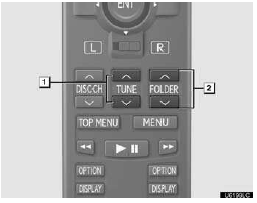
1. Selecting a file
2. Selecting a folder
Push “ ” or “
 ” of “TUNE” until the desired file number appears on the screen.
Selecting a folder
Push “ ” or “ ” of “FOLDER” until the desired folder number appears on the screen.
Fast forwarding or reversing a file
Push and hold “ ” or “ ” of “TUNE”.
Test yourself
A quick Lexus GX quiz: every answer comes with an explanation and a link to the manual page.
Was this page helpful?