Crawl Control (with Turn Assist function)
Crawl Control allows travel on extremely rough off-road surfaces at a fixed low speed without pressing the accelerator or brake pedal.
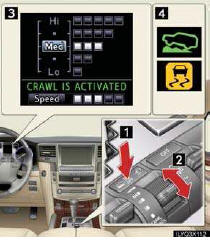
To select a speed mode, shift the Crawl Control switch forward or backward.
1 ON/OFF
2 Speed selection switch
3 Multi-information display
The operating status and speed select status of the Crawl Control are shown on the multi-information display.
4 Indicator
The Crawl Control indicator is lit and the slip indicator flashes when operating.
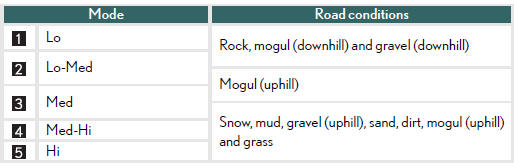
■Speed modes
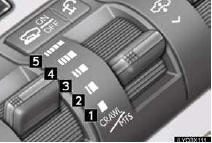
The following table shows some typical terrains and the recommended speed modes.
■Turn Assist function
This function assists cornering performance in accordance with steering operation when driving through a tight corner. It maintains vehicle speed while driving and reduces the number of turns needed to navigate a corner that requires turning the wheel in the opposite direction.
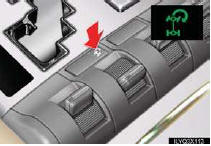
Press the Turn Assist switch while Crawl Control is operating.
Turn Assist indicator will come on.
To turn the system off, press the switch again.
Test yourself
A quick Lexus LX quiz: every answer comes with an explanation and a link to the manual page.