Dynamic Radar Cruise Control
Dynamic radar cruise control supplements conventional cruise control with a vehicle-tovehicle distance control mode.
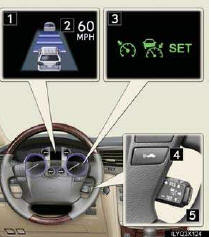
1 Display
2 Set speed
3 Indicators
4 Vehicle-to-vehicle distance button
5 Cruise control switch
■Cruise control display
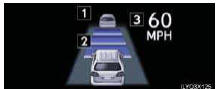
Cruise control settings are shown on the multiinformation display.
1 Vehicle ahead indicator
2 Vehicle-to-vehicle distance
3 Set speed
■Vehicle-to-vehicle distance control mode
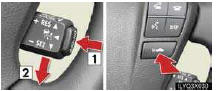
1 Press the “ON-OFF” button.
2 Accelerate or decelerate to the desired speed, and then push the lever down.
Following distance can be adjusted using the vehicle-to-vehicle distance control switch.
■Adjusting the set speed
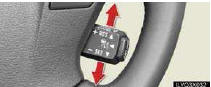
To increase speed: push the lever up.
To decrease speed: push the lever down.
Release the lever when the desired speed is reached.
■Canceling and resuming the speed control
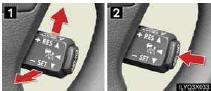
1 To temporarily cancel the dynamic radar cruise control, pull the lever toward you. To resume the cruise control, push the lever up.
2 To turn the system off, press the “ON-OFF” button.
■Constant speed control mode
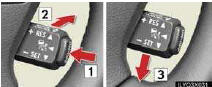
1 Press the “ON-OFF” button.
2 Push the lever forward and hold for approximately one second.
3 Accelerate or decelerate to the desired speed, and then push the lever down.
The vehicle-to-vehicle distance control mode maintains the preset cruising speed as long as no vehicle is detected ahead.
Test yourself
A quick Lexus LX quiz: every answer comes with an explanation and a link to the manual page.