Initial screen
1 When the “ENGINE START STOP” switch is in ACCESSORY or IGNI- TION ON mode, the initial screen will be displayed and the system will begin operating.

• Images shown on the initial screen can be changed to suit individual preferences.
●When the vehicle is stopped with the engine running, always apply the parking brake for safety.
• After a few seconds, the “CAUTION” screen will be displayed.

•After about 5 seconds, the “CAUTION” screen automatically switches to the map screen. (If a button other than the “MAP/ VOICE” button is pressed, the function’s corresponding screen will be displayed.)
MAINTENANCE INFORMATION
This system reminds users when to re- place certain parts or components and shows dealer information (if registered) on the screen.
When the vehicle reaches a previously set driving distance or date specified for a scheduled maintenance check, the “Maintenance Reminder” screen will be displayed when the navigation system is turned on.
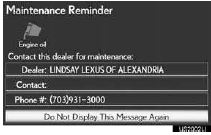
• This screen goes off if the screen is not operated for several seconds.
•To prevent this screen from being dis- played again, touch “Do Not Display This Message Again”.
•To register maintenance information
Test yourself
A quick Lexus LX quiz: every answer comes with an explanation and a link to the manual page.