Voice settings
Voice guidance can be set.
1 Press the “SETUP” button.

2 Touch “Voice”.
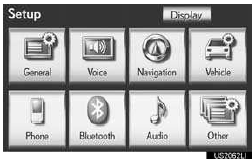
3 Touch the items to be set.
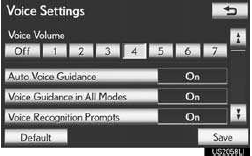
4 Touch “Save”.
SCREEN FOR VOICE SETTINGS
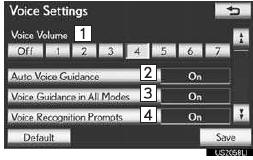
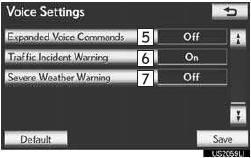
•On this screen, the following functions can be performed:
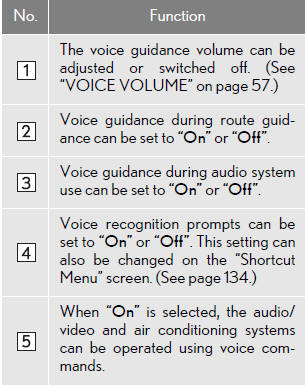
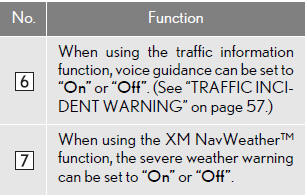
•To reset all setup items, touch “Default”.
VOICE VOLUME
The voice guidance volume can be ad- justed or switched off.
1 Press the “SETUP” button.
2 Touch “Voice” on the “Setup” screen.
3 Select the desired level by touching the appropriate number.
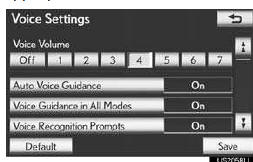
• If voice guidance is not needed, touch “Off” to disable the feature.
4 Touch “Save”.
TRAFFIC INCIDENT WARNING
Traffic congestion information can be received via voice guidance while being guided to the desired destination.
1 Press the “SETUP” button.
2 Touch “Voice” on the “Setup” screen.
3 Touch “On” of “Traffic Incident Warn- ing”.
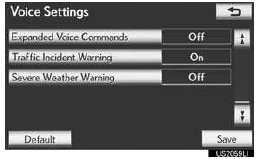
4 Touch “Save”.
INFORMATION
●When the “Traffic Information” indicator is dimmed, “Avoid Traffic”, “Traffic Incident Warning” and “Show Free Flowing Traffic” will not operate.
Test yourself
A quick Lexus LX quiz: every answer comes with an explanation and a link to the manual page.