Information Display Input/Output Check Mode
In this mode, it is possible to verify the items in the following chart.
Check code |
Check item |
Related items |
01 |
|
CAN system
|
02 |
|
CAN system
|
04 |
Light switch |
|
06 |
Ignition switch*1/Push button start*2 |
Ignition switch*1/Push button start*2 |
07 |
Dimmer cancel switch (Instrument cluster) |
|
— |
LCD |
LCD |
*1 Without advanced keyless entry and push button start system *2 With advanced keyless entry and push button start system NOTE:
The check codes are displayed in numerical order. (While performing the inspection, if you want to inspect a check code with a number smaller than the code number you are currently inspecting, terminate the check mode then repeat the inspection from the beginning.)
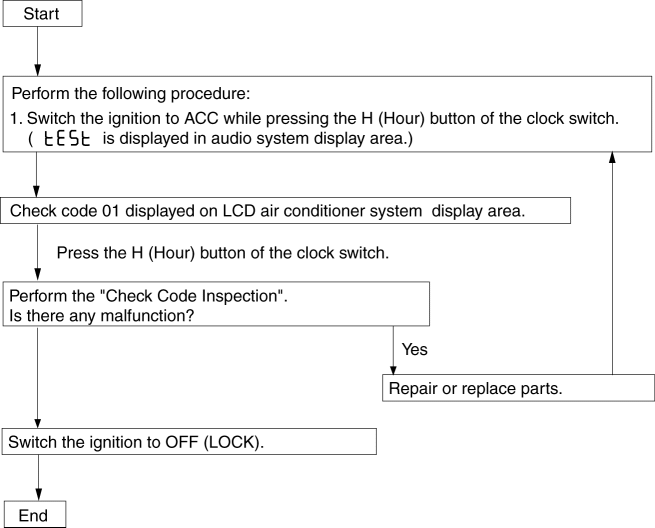
Check Code Inspection Check code 01
Check code 01 |
CAN system |
DISPLAY |
ACTION |
 |
CAN system of information display or multi information display is normal. |
 |
CAN system communication error. (DTC U2516). |
Check code 02
Check code 02 |
|
||
INSPECTION CONDITION |
DISPLAY |
ACTION |
|
If there is a malfunction, the diagnostic results are displayed once each in the order of audio unit and climate control unit and instrument cluster. |
 |
All communications are normal. |
|
Audio unit |
 |
Communication to audio unit is normal. |
|
 |
Communication error to audio unit. (DTC U0184). |
||
 |
Vehicle without audio unit. |
||
Climate control unit |
 |
Communication to climate control unit is normal. |
|
 |
Communication error to climate control unit. (DTC U0164). |
||
 |
Vehicle without climate control unit. |
||
Instrument cluster |
 |
Communication to instrument cluster is normal. |
|
 |
Communication error to instrument cluster. (DTC U0181). |
||
Check code 04
Check code 04 |
TNS ON/OFF signal |
||
STEP |
INSPECTION CONDITION |
DISPLAY |
ACTION |
1 |
Turn the light switch to the ON position. |
 |
Go to the next step. |
 |
Verify that the voltage of information display or multi information display terminal 1B is B+ .
|
||
2 |
Turn the light switch off. |
|
Verify that the voltage of the information display or multi information display terminal 1B is 1.0 V or less .
|
|
Input signal to the information display or multi information display is normal. |
||
Check code 06
Check code 06 |
Ignition switch ON/OFF signal |
||
STEP |
INSPECTION CONDITION |
DISPLAY |
ACTION |
1 |
Switch the ignition to ON. |
|
Go to the next step. |
|
Verify that the voltage of information display or multi information display terminal 1E is B+ .
|
||
2 |
Switch the ignition to ACC. |
|
Verify that the voltage of the information display or multi information display terminal 1E is 1.0 V or less .
|
|
Input signal to the information display or multi information display is normal. |
||
*1 Without advanced keyless entry and push button start system *2 With advanced keyless entry and push button start system Check code 07
Check code 07 |
Dimmer cancel ON/OFF signal |
||
STEP |
INSPECTION CONDITION |
DISPLAY |
ACTION |
1 |
Panel light control switch turned to dimmer cancel ON |
|
Go to the next step. |
|
Verify that the voltage of information display or multi information display terminal 1B is B+ .
|
||
2 |
Panel light control switch turned to dimmer cancel OFF |
|
Verify that the voltage of the information display or multi information display terminal 1B is 1.0 V or less .
|
|
Input signal to the information display or multi information display is normal. |
||
LCD Information display
Check code — |
LCD |
||
DISPLAY |
ACTION |
||
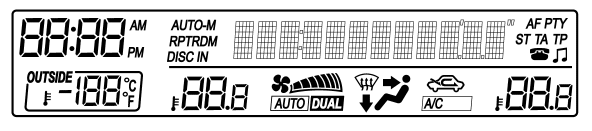 |
All segments and dots illuminated. |
LCD is normal. |
|
Except above |
Replace the information display. |
||
Multi information display
Check code — |
LCD |
||
DISPLAY |
ACTION |
||
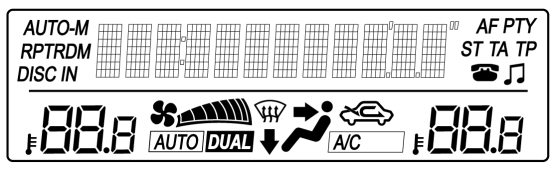 |
All segments and dots illuminated. |
LCD is normal. |
|
Except above |
Replace the multi information display. |
||
Test yourself
A quick Mazda 3 quiz: every answer comes with an explanation and a link to the manual page.