Wheel Unit ID Registration
After the wheel unit replacement, registration of the wheel unit identification codes must be performed.
ID registration can be done using the M-MDS, or not using the M-MDS.
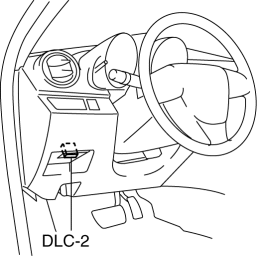
1. Connect the M-MDS to DLC-2.
2. After the vehicle is identified, select the following items from the initialization screen of the M-MDS.
This function is available for only the IDS (laptop PC).
Select the “Body”.
Select the “TPMS Functions”.
Select the “Wheel Unit ID Registration”.
3. Select an item from the screen menu.
Wheel unit ID registration: WU ID Registration
Monitoring wheel unit ID: Monitor WU ID Registration
.
5. Switch the ignition to ON (engine ON).
6. Verify that the TPMS warning light turns on and off in 0.5 scycles repeatedly.
7. Drive the vehicle at a speed of 25 km/h {15,5 mph} or more for 10 minto implement the wheel unit ID registration.
NOTE:- If the ID registration is not completed even after driving the vehicle for 10 min or more at a speed of 25 km/h {15,5 mph} or more
, the TPMS warning light flashes.
8. Verify that the TPMS warning light turns off.
NOTE:- If the wheel unit ID registration cannot be performed after driving 10 min
or more, refer to the symptom troubleshooting procedure.
1. Switch the ignition to the ON, then switch it to off.
2. Leave the vehicle with the engine off for 15 min or more.
3. Drive the vehicle at a speed of 25 km/h {15,5 mph} or more for 10 min or more.
4. After driving for 10 min, verify that the TPMS warning light does not flash and is not illuminated.
Test yourself
A quick Mazda 3 quiz: every answer comes with an explanation and a link to the manual page.