When Driving
Maintenance Monitor
In this manual: When Driving
~1min read
The following maintenance period notifications can be displayed by turning the Maintenance Monitor on.
- Scheduled Maintenance
- Tire Rotation
- Oil Change
For the setting method and indications for the maintenance monitor, refer to the Maintenance Monitor.
The maintenance monitor displays the information when the ignition is switched ON.
NOTE
This function is inoperable while the vehicle is being driven.
Message displayWhen the remaining time or the distance approaches 0, a message is displayed each time the ignition is switched ON.
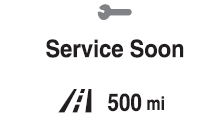
NOTE
- If any of the INFO switch is pressed while a message is displayed, it will no longer be displayed the next time the ignition is switched ON.
- After the vehicle is serviced and the remaining time/distance is reset, the message for the next maintenance period will be displayed when the remaining distance or time to the next maintenance period approaches 0 (displays when engine is started).
- If there are multiple messages, they are displayed according to their order.
- If OFF is set for Messages, messages are not displayed.
Test yourself
A quick Mazda 6 quiz: every answer comes with an explanation and a link to the manual page.
Was this page helpful?