Driver Information & Multimedia
Head up Display Main Switch
In this manual: Driver Information & Multimedia
~1min read
Removal and Installation
REMOVAL
Remove instrument pad A. Refer to Removal and Installation.
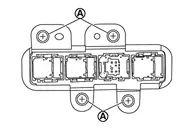
Remove switch bracket mounting screws  .
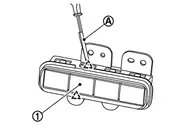
Disengage fixing pawl with removal tool to remove Head up Display main switch  from switch bracket.
 |
: Pawl |
INSTALLATION
Installation is in the reverse order of removal.
Was this page helpful?