Action Test
Always perform the ICC system action test to check that the ICC system operates normally after replacing the distance sensor (ICC sensor) or repairing any ICC system malfunction.
CHECK FOR MAIN SWITCH
Start the engine.
Press the MAIN switch
 (less than 1.5 seconds).

Information display status Set distance indicator 
: Long mode Set Nissan Murano vehicle speed indicator 
: “——”
“km/h” (“MPH”)MAIN switch indicator 
: ON Check the ICC system display on the information display to check that the Nissan Murano vehicle-to-vehicle distance control mode is ready for activation.
Press the MAIN switch, and check that the ICC system display on the information display turns OFF when the ICC system is deactivated.
Check that the ICC system display on the information display turns OFF after starting the engine again.
GO TO 2.
CHECK FOR DISTANCE SWITCH
Start the engine.
Press the MAIN switch (less than 1.5 seconds).
Press the DISTANCE switch.
Check that the set distance indicator changes display in order of: (Long) → (Middle) → (Short).
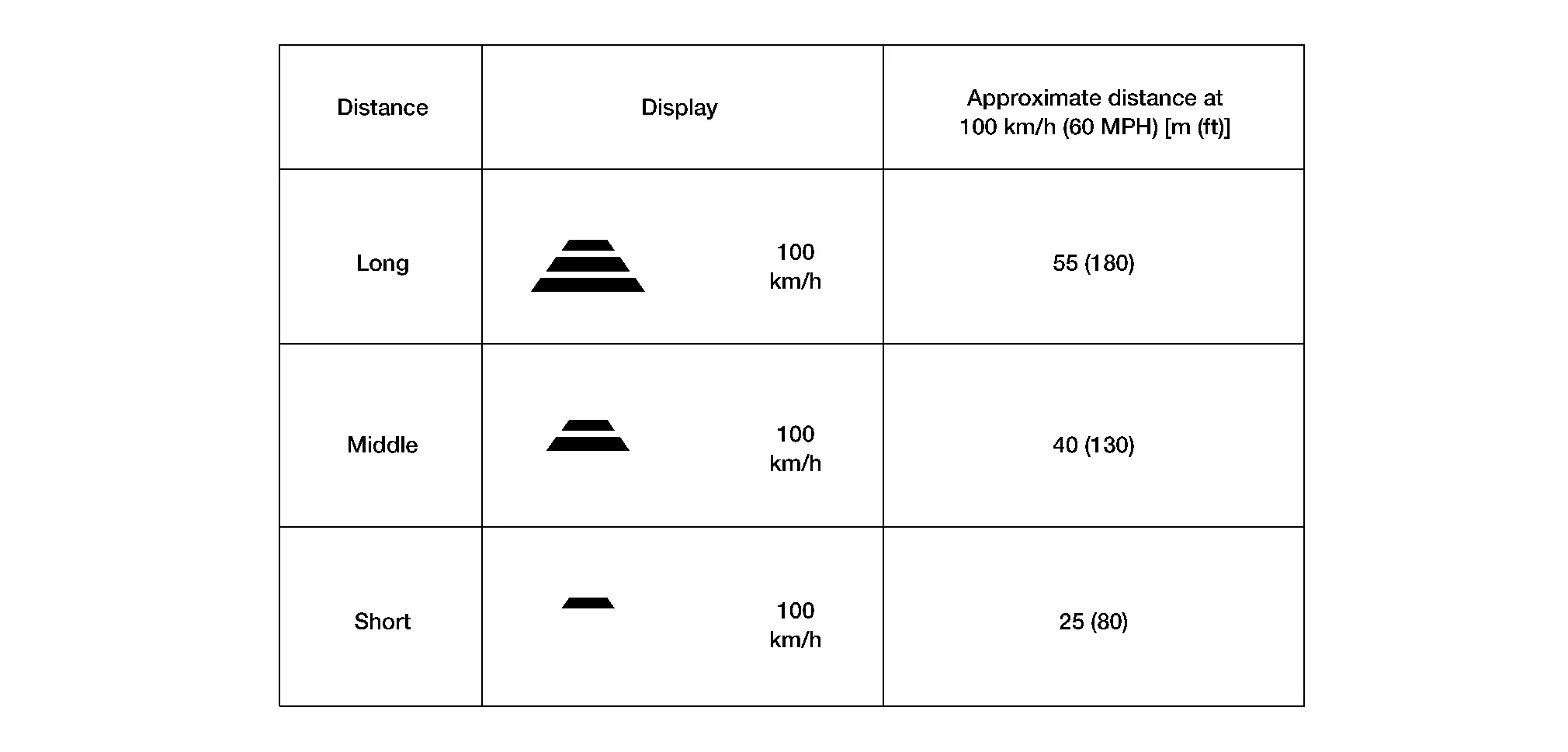
GO TO 3.
CHECK FOR RES/+, SET/-, AND CANCEL SWITCHES
Check that RES/+, SET/-, and CANCEL switches are operated smoothly.
Check that switches come up as hand is released from the switches.
GO TO 4.
SET CHECKING (1)
Start the engine.
Press the MAIN switch (less than 1.5 seconds) and turn the Intelligent Cruise control ON.
Drive the Nissan Murano vehicle at 32 km/h or more.
Push down the SET/- switch.
Check that the desired speed is set and Intelligent Cruise control starts when releasing SET/- switch.
GO TO 5.
CHECK FOR INCREASE OF CRUISING SPEED (1)
Set the Intelligent Cruise control at desired speed.
Check that the set speed increases by 1 km/h as RES/+ switch is pushed up.
GO TO 6.
CHECK FOR DECREASE OF CRUISING SPEED (1)
Set the Intelligent Cruise control at desired speed.
Check that the set speed decreases by 1 km/h as SET/- switch is pushed down.
GO TO 7.
SET CHECKING (2)
Stop the Nissan Murano vehicle.
Drive the vehicle at less than approximately 32 km/h.
Push down the SET/- switch when the system detects a Nissan Murano vehicle ahead.
Check that the vehicle-to-vehicle distance control mode is performed so that the Nissan Murano vehicle maintains a proper distance according to the vehicle speed [maximum: approximately 32 km/h] when releasing SET/- switch.
GO TO 8.
CHECK FOR INCREASE OF CRUISING SPEED (2)
Set the Intelligent Cruise control when the Nissan Murano vehicle speed is less than approximately 32 km/h and when a vehicle ahead is detected.
Check that the set speed increases by 1 km/h as RES/+ switch is pushed up.
GO TO 9.
CHECK FOR DECREASE OF CRUISING SPEED INSPECTION (2)
Set the Intelligent Cruise control when the Nissan Murano vehicle speed is less than approximately 32 km/h and when a vehicle ahead is detected.
Set the set Nissan Murano vehicle speed to the desired vehicle speed “check for increase of cruising speed”.
Check that the set speed decreases by 1 km/h as SET/- switch is pushed down.
GO TO 10.
CHECK FOR CANCELLATION OF INTELLIGENT CRUISE CONTROL
Check that the Intelligent Cruise control is canceled when performing the following operations:
When the brake pedal is depressed after Intelligent Cruise control is set and the Nissan Murano vehicle is driven.
When the selector lever is in the “N” position after Intelligent Cruise control is set and the Nissan Murano vehicle is driven.
When the MAIN switch is turned OFF after Intelligent Cruise control is set and the Nissan Murano vehicle is driven.
When the CANCEL switch is pressed after Intelligent Cruise control is set and the Nissan Murano vehicle is driven.
GO TO 11.
CHECK FOR RESTORING SPEED THAT IS SET BY INTELLIGENT CRUISE CONTROL BEFORE CANCELLATION
Check that the Nissan Murano vehicle restores the previous speed kept before the system deactivation when performing the following operations.:
Drive the Nissan Murano vehicle when the Intelligent Cruise control is set and depress the brake pedal to cancel the control. Check that the Nissan Murano vehicle restores the previous vehicle speed kept before the system deactivation when pushing up the RES/+ switch.
Drive the Nissan Murano vehicle when the Intelligent Cruise control is set and shift the selector lever to the “N” position to cancel the control. Check that the Nissan Murano vehicle restores the previous vehicle speed kept before the system deactivation when shifting the selector lever to the “D” position and pushing up the RESUME/+ switch.
Drive the Nissan Murano vehicle when the Intelligent Cruise control is set and press the CANCEL switch to cancel the control. Check that the Nissan Murano vehicle restores the previous vehicle speed kept before the system deactivation when pushing up the RESUME/+ switch.
Inspection End.