How to enable/disable the I-LI system
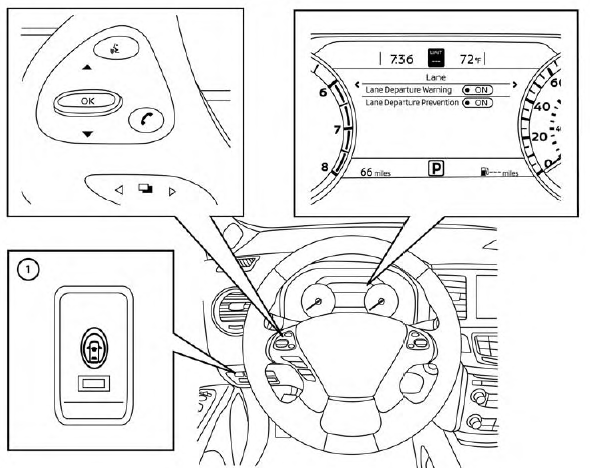
The I-LI system can be turned on or off using the dynamic driver assistance switch  on the instrument panel, “Settings” in the vehicle information display or using the startup display in the vehicle information display.
When the system is off, the indicator light on the dynamic driver assistance switch  turns off and the LDW indicator (green) turns off.
Using dynamic driver assistance switch:
To turn on the I-LI system, push the dynamic driver assistance switch on the instrument panel after starting the engine.
The LDW indicator (green) on the vehicle information display will appear.
Push the dynamic driver assistance switch again to turn off the I-LI system.
The LDW indicator (green) on the vehicle information display will turn off.
The I-LI system will be automatically turned off when the engine is turned off.
Using “Settings” in the vehicle information display:
- After starting the engine, press the
 button until “Settings” displays in the vehicle information display and then press the OK button. Use the
 button to select “Driver Assistance.” Then press the OK button.
- Select “Lane” and press the OK button.
- Select “Lane Departure Prevention” and press the OK button to turn the system on or off.
Using the “Driving Aids” screen in the vehicle information display:
- Use the
 buttons on the steering wheel to scroll to the Driving Aids screen.
- Press the OK button to access the Driver Assistance menu.
- Select “Lane” and press the OK button until “Lane Prevent” is displayed.
- Press the
 buttons to return to the Driving Aids screen.