Pre-driving checks and adjustments
Liftgate position setting (if so equipped)
In this manual: Pre-driving checks and adjustments
3steps
~18min
2/5difficulty
Done 0 of 3
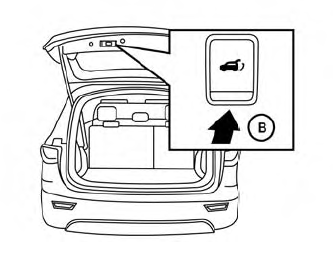
The liftgate can be set to open to a specific height (garage mode) by performing the following:
- Open the liftgate using the liftgate instrument panel switch, liftgate opener switch or the Intelligent Key button.
- Pull the liftgate down and move to the desired height position (the liftgate will have some resistance when being manually adjusted).
- Press and hold the power liftgate close switch
 located on the liftgate for more than 3 seconds or until two beeps are heard.
The liftgate will open to the selected position setting. To change the position of the liftgate, repeat steps 1-3 for setting the position of the liftgate.
Was this page helpful?