Pre-driving checks and adjustments
Memory storage function (key-link)
In this manual: Pre-driving checks and adjustments
4steps
~24min
2/5difficulty
Done 0 of 4
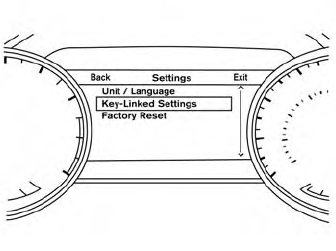
Use the following process to setup key-link:
- Unlock the vehicle with the desired Intelligent Key while the ignition is OFF.
- Place the ignition in the ON position.
- Within the “Settings” menu of the vehicle information display, select “Key- Linked Settings” and press the OK button on the steering switch.
- While in the menu, press the OK button on the steering switch to turn the system ON/OFF.
Once step 4 is completed, every time the ignition is switched from ON to OFF, the memory positions of the driver’s seat, automatic steering wheel (if so equipped) and the outside mirrors are linked to the Intelligent Key.
Follow the same procedure if you want to link the 2nd, 3rd or 4th Intelligent Key.
Recalling Intelligent Key memory positions
If the “Key-Linked Settings” are enabled in the vehicle information display for that particular key, every time you enter the vehicle the driver’s seat, automatic steering wheel (if so equipped), and outside mirrors will automatically move to the driver’s last position of the respective Intelligent Key.
Was this page helpful?