Pre-driving checks and adjustments
Memory storage function (switch)
In this manual: Pre-driving checks and adjustments
3steps
~18min
2/5difficulty
Done 0 of 3
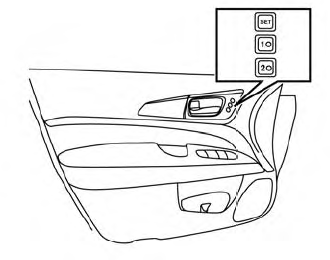
Use the following process to manually store the two memory positions in the switch:
- The vehicle should be stopped while setting the memory.
- Adjust the driver’s seat, steering columnand outside mirrors to the desired positions by manually operating each adjusting switch. For additional information, refer to “Seats” in the “Safety— Seats, seat belts and supplemental restraint system” section of this manual and “Steering wheel” and “Outside mirrors” in this section.
- Push the SET switch and, within 5 seconds, push the memory switch (1 or 2).
The indicator light for the pushed memory switch will come on and stay on for approximately 5 seconds. The chime will sound when the memory is stored.
Recalling switch memory positions
To recall the manually stored positions, press the memory switch (1 or 2). The driver’s seat, outside mirrors and automatic steering wheel (if so equipped) will move to the positions stored to those buttons.
Was this page helpful?