Operation. Automatic Speed Control Device (ascd)
SWITCHES AND INDICATORS
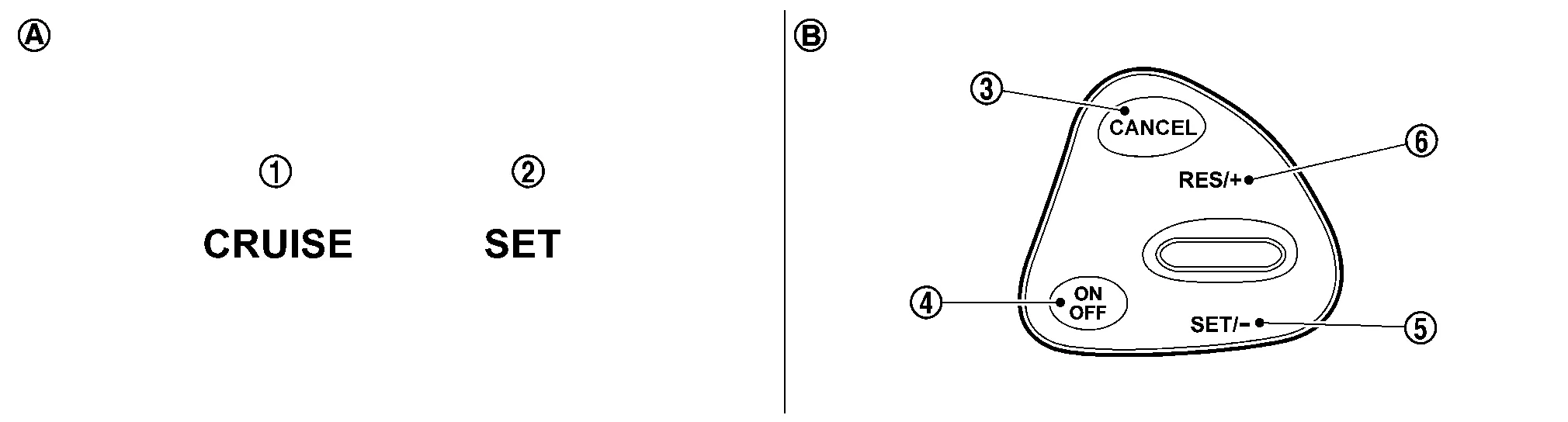
| 1. | CRUISE indicator | 2. | SET indicator | 3. | CANCEL switch |
| 4. | ON/OFF (MAIN) switch | 5. | SET- | 6. | RES+ |
| A. | On the combination meter (Information display) | B. | On the steering wheel |
SET SPEED RANGE
ASCD system can be set the following vehicle speed.
| Minimum speed (Approx.) | Maximum speed (Approx.) |
|---|---|
| 40 km/h | 144 km/h |
SWITCH OPERATION
| Item | Function |
|---|---|
| CANCEL switch | Cancels the cruise control driving. |
| RES+ |
|
| SET- |
|
| ON/OFF (MAIN) switch | Master switch to activate the ASCD system. |
CANCEL OPERATION
When any of following conditions exist, cruise operation will be canceled.
CANCEL switch is pressed
ON/OFF (MAIN) switch pressed (Set speed is cleared)
More than 2 switches at ASCD steering switch are pressed at the same time (Set speed will be cleared)
Brake pedal is depressed
Selector lever position is changed to N, P or R
Nissan Murano Vehicle speed decreased to 13 km/h lower than the set speed
TCS system is operated
When the ECM detects any of the following conditions, the ECM will cancel the cruise operation and inform the driver by blinking indicator.
Engine coolant temperature is slightly higher than the normal operating temperature, CRUISE indicator may blink slowly.
When the engine coolant temperature decreases to the normal operating temperature, CRUISE indicator will stop blinking and the cruise operation will be able to work by pressing SET- switch or RES+ switch.
Malfunction for some self-diagnoses regarding ASCD control: SET indicator will blink quickly.
If MAIN switch is turned to OFF during ASCD is activated, all of ASCD operations will be canceled and Nissan Murano vehicle speed memory will be erased.