Choosing a language
You can interact with the Bluetooth® Hands- Free Phone System using English, Spanish or French.
To change the language, perform the following.
1. Push and hold the  button for more than 5 seconds.
2. The system announces: “Push the PHONE SEND ( ) button for the hands-free phone system to enter the speaker adaptation mode or push the PHONE END ( ) button to select a different language.” 3. Push the button.
For information on speaker adaptation, see “Speaker Adaptation (SA) mode” later in this section.
4. The system announces the current language and gives you the option to change the language to Spanish (in Spanish) or French (in French). Use the following chart to select the language.
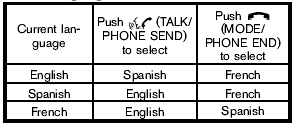
5. If you decide not to change the language, do not push either button. After 5 seconds, the VR session will end, and the language will not be changed.
Test yourself
A quick Nissan Rogue quiz: every answer comes with an explanation and a link to the manual page.