Connecting procedure
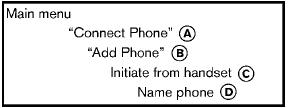
1. Push the  button on the steering wheel.
The system announces the available commands.
2. Say: “Connect Phone” A . The system acknowledges the command and announces the next set of available commands.
3. Say: “Add phone” B . The system acknowledges the command and asks you to initiate pairing from the phone handset C .
The connecting procedure of the cellular phone varies according to each cellular phone. See the cellular phone Owner’s Manual for details. You can also visit www.
nissanusa.com/bluetooth for instructions on connecting NISSAN recommended cellular phones.
When prompted for a Passkey code, enter “1234” from the handset. The Passkey code “1234” has been assigned by NISSAN and cannot be changed.
4. The system asks you to say a name for the phone D .
If the name is too long or too short, the system tells you, then prompts you for a name again.
Also, if more than one phone is connected and the name sounds too much like a name already used, the system tells you, then prompts you for a name again.
Test yourself
A quick Nissan Rogue quiz: every answer comes with an explanation and a link to the manual page.