Instruments and controls
Clock
In this manual: Instruments and controls
~1min read
The time and date are shown on the Information Display.
Setting the date and time: Press the CONFIG button. The Settings menu is displayed.
Select Time & Date.
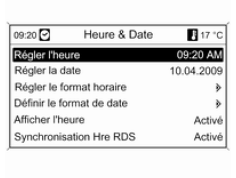
Setting options that can be selected:
- Set time: changes the time shown on the display
- Set date: changes the date shown on the display.
- Set time format: switches the time display between 12-hour and 24-hour format.
- Set date format: switches the date display between MM/DD/YYYY and DD.MM.YYYY formats.
- Show time: turns the time display on the display on / off.
- RDS time sync: the RDS signal of most VHF stations sets the time automatically. RDS time synchronization may take a few minutes.
Some stations do not transmit a correct time signal.
In this case, it is advisable to deactivate automatic time synchronization.Vehicle personalisation 116.
Test yourself
A quick Opel Insignia quiz: every answer comes with an explanation and a link to the manual page.
Was this page helpful?