Instruments and controls
Vehicle messages
In this manual: Instruments and controls
~1min read
Messages are mainly shown in the driver information centre (DIC). In some cases they are accompanied by a warning chime.
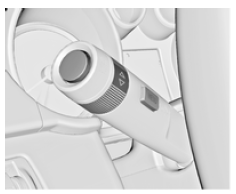
Press the SET/CLR button, the MENU button or turn the adjusting knob to confirm a message.
Vehicle messages on a mid-level display

Vehicle messages are shown as coded numbers.
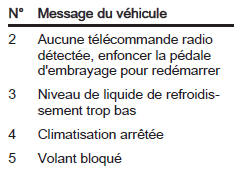
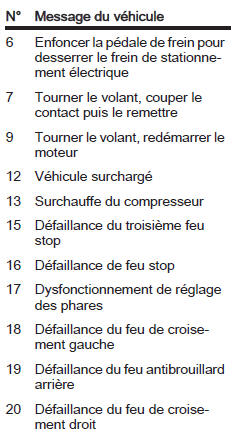
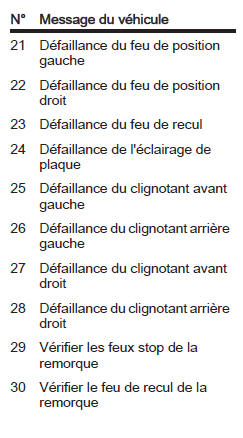
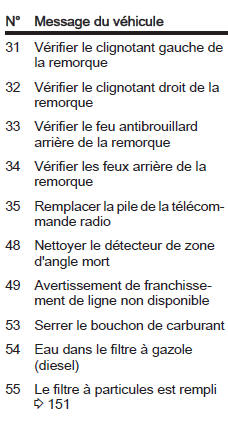
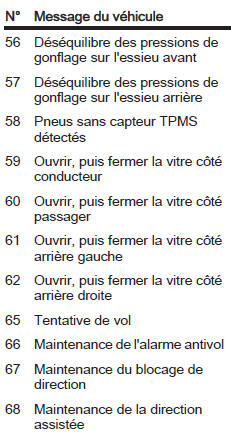
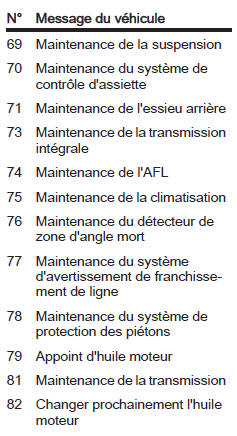
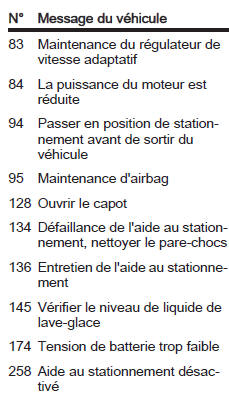
Vehicle messages on the top-level display or top-level combi display
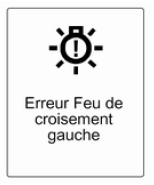
Vehicle messages are shown as text. Follow the instructions given in the messages.
The system displays messages relating to the following areas:
- Fluid levels;
- Anti-theft alarm
- Brakes;
- Drivetrain systems;
- Driving control systems;
- Cruise control;
- Object detection systems;
- Lighting, bulb replacement;
- Windscreen wipers / washers;
- Doors, windows;
- Remote radio control;
- Seat belts;
- Airbag systems;
- Engine and transmission;
- Tyre pressure;
- Diesel particulate filter.
Vehicle messages on the colour information display
Some important messages also appear on the colour information display. Press the multifunction button to confirm a message. Some messages only appear for a few seconds.
Test yourself
A quick Opel Insignia quiz: every answer comes with an explanation and a link to the manual page.
Was this page helpful?