Personal Settings in the Graphic Information Display
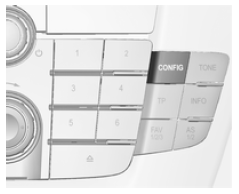
Press the CONFIG button. The Settings menu is displayed.
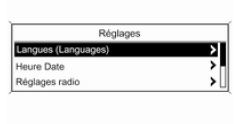 The following
settings can be selected by turning and pressing the multifunction knob:
- Sport Mode Settings
- Languages
- Time Date
- Radio Settings
- Phone Settings
- Vehicle Settings
In the corresponding submenus, the following settings can be changed:
Sport mode settings
The driver can select the functions that will be activated in Sport mode 163.
- Sport suspension: the suspension becomes firmer.
- Sport powertrain performance: the response to the accelerator pedal and gear changes is quicker.
- Sport steering: the steering assistance is reduced.
- Sport all-wheel drive: more engine torque is transferred to the rear axle.
- Sport mode instrument backlighting: changes the instrument lighting colour.
Languages
Selection of the desired language.
Time Date
See Clock 85.
Radio Settings
See the Infotainment System manual.
Phone Settings
See the Infotainment System manual.
Vehicle Settings
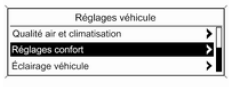 Air Quality
and Climate Control
Automatic fan speed: changes the blower control.
Temp. zones at vehicle start: switches between single-zone and dual-zone temperature settings.
A/C mode: switches cooling on or off, or selects the previous settings.
Automatic demisting: helps demist the windscreen by automatically selecting the required settings and automatic climate control mode.
Automatic rear demisting: automatically activates rear window defogger.
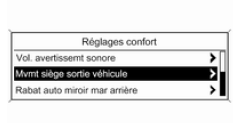 Comfort
settings
Warning chime volume: changes the volume of the warning chimes.
Seat movement on vehicle exit: activates or deactivates the power seat easy exit function.
Reverse-gear mirror tilt: activates or deactivates the parking aid function of the passenger-side exterior mirror.
Mirror fold with comfort lock: activates or deactivates folding of the mirrors with the remote control.
Driver personalisation: activates or deactivates the personalisation function.
Wiper in reverse gear: activates or deactivates automatic activation of the rear wiper when reverse gear is engaged.
- Parking assist / collision detection
Parking assist: activates or deactivates the ultrasonic parking assist.
Collision preparation: changes or activates/deactivates the settings for adaptive cruise control, forward collision alert and the imminent collision braking system.
- Vehicle lighting
Lighting after vehicle exit: activates or deactivates the lighting around the vehicle and changes its duration.
Welcome lighting on unlocking: activates or deactivates the welcome lighting of the vehicle.
- Electric door lock settings
Automatic door unlock: activates or deactivates automatic unlocking of the doors after the engine is switched off. Activates or deactivates automatic locking of the doors after driving off.
Lock prevention with door open: activates or deactivates automatic locking when one of the doors is open.
Timed door locking: activates or deactivates timed locking of the doors.
- Remote lock/unlock/remote start
Remote unlock confirmation: activates or deactivates confirmation of unlocking by the hazard warning lights.
Remote door unlock: changes the configuration to unlock the driver's door only or the entire vehicle.
Automatic door relock: activates or deactivates automatic relocking after unlocking without opening the vehicle.
- Restore default settings
Restore default settings: resets all settings to their default values.
Test yourself
A quick Opel Insignia quiz: every answer comes with an explanation and a link to the manual page.