Colour display (with WIP Nav)
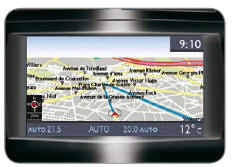
Displays the following information:
- the time,
- the date,
- the outside temperature (the displayed value flashes when there is a risk of black ice),
- the opening check,
- vehicle function status messages, displayed temporarily,
- warning messages,
- audio functions,
- trip computer information,
- air conditioning settings,
- on-board navigation system information.
Menu "SETUP"
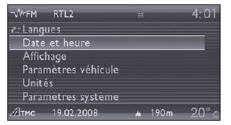
Press the SETUP key to access the "SETUP" menu. It gives access to the following functions:
- Languages,
- Date and time,
- Display,
- Vehicle settings,
- Units,
- System settings.
Languages
This menu lets you select the display language: German, English, Spanish, French, Italian, Dutch, Polish or Portuguese.
Date and time
This menu lets you set the date and time, the date format and the time format (see the "Audio and Telematics" chapter).
Display
This menu lets you adjust the display brightness, the display colour scheme and the map colour (day/night and auto modes).
Vehicle settings
This menu lets you switch certain driving and comfort features on or off:
- air conditioning (A/C),
- vehicle information,
- vehicle access,
- driving assistance,
- lighting configuration,
- comfort lighting.
Units
This menu lets you select the units: temperature (C or F) and fuel consumption (km/l, l/100, miles or mpg).
System settings
This menu lets you restore the factory settings, display the software version and enable scrolling text.
 For safety reasons,
the driver must configure the multifunction displays with the vehicle stationary.
Test yourself
A quick Peugeot 407 quiz: every answer comes with an explanation and a link to the manual page.