Multifunction displays
High-definition colour display (with WIP Com)
In this manual: Multifunction displays
~1min read
Displays the following information:
- the time,
- the date,
- the outside temperature (the displayed value flashes when there is a risk of black ice),
- the opening check,
- vehicle function status messages, displayed temporarily,
- warning messages,
- audio functions,
- trip computer information,
- air conditioning settings,
- on-board navigation system information.
General menu
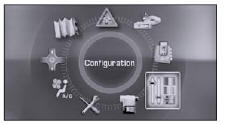
Press the "MENU" button to access the main menu and select one of the following functions: Navigation-guidance, Map, Traffic information, Audio functions, Telematics, Configuration, Video, Vehicle diagnostics and Air conditioning.
The "Configuration" menu gives access to the following functions:
- Display configuration,
- Sounds,
- Language selection,
- Set vehicle parameters.
Setting the vehicle settings
Allows you to enable or disable certain driving and comfort features:
- permanent boot locking on 407 Saloon,
- automatic headlight activation,
- automatic welcome lighting,
- automatic rear wiper with reverse gear on 407 SW.
Display configuration
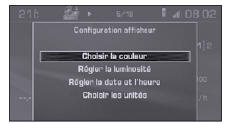
- Select colour,
- Adjust brightness,
- Set date and time,
- Select units.
Test yourself
A quick Peugeot 407 quiz: every answer comes with an explanation and a link to the manual page.
Was this page helpful?