Battery replacement
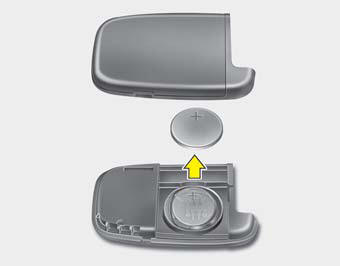
A smart key battery should last for several years, but if the smart key is not working properly, try replacing the battery with a new one. If you are unsure how to use your smart key or replace the battery, contact an authorized HYUNDAI dealer.
1. Insert a slim tool into the opening and gently pry open the rear cover of the smart key.
2. Replace the battery with a new battery (CR2032). When replacing the battery, make sure the battery positive “+” symbol faces up as indicated in the illustration.
3. Install the battery in the reverse order of removal.
CAUTION
• The smart key is designed to give you years of trouble-free use, however it can malfunction if exposed to moisture or static electricity. If you are unsure how to use or replace the battery, contact an authorized HYUNDAI dealer.
• Using the wrong battery can cause the smart key to malfunction. Be sure to use the correct battery.
• To avoid damaging the smart key, don't drop it, get it wet, or expose it to heat or sunlight.
• An inappropriately disposed battery can be harmful to the environment and human health.
Dispose the battery according to your local law(s) or regulation.
Test yourself
A quick Hyundai Sonata LF quiz: every answer comes with an explanation and a link to the manual page.