Using the Audio System
Making the Best Use of the Audio System
You can adjust the sound quality, volume balance, ASL and AUX settings.
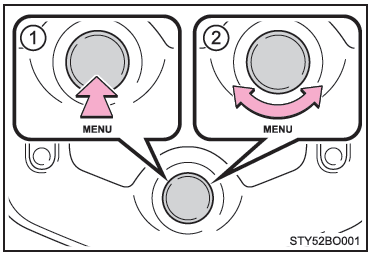
- Displaying the "SETUP" Menu / Selecting the Mode
- Changing the following settings
- Sound Quality and Volume Balance The sound quality and balance settings can be changed to achieve the best sound.
- Automatic Sound Levelizer (ASL)
- AUX Setting
Using the Audio Control Function
■ Changing the sound quality modes
- Press the "MENU" button.
- Turn the knob to select "Sound settings".
- Press the knob.
- Turn the knob until the desired mode is displayed.
■ Adjusting the sound quality Turn the "MENU" knob to adjust the level.
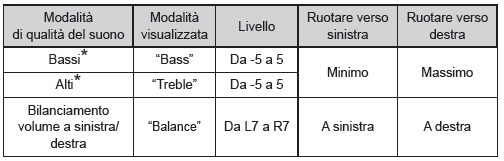
*: The sound quality level is adjusted individually for each audio mode.
Press the knob or (Back) to return to the sound settings menu.
■ Adjusting the Automatic Sound Levelizer (ASL) When ASL is selected, turn the "MENU" knob to change the ASL adjustment level.
You can select "LOW", "MID", "HIGH" or "OFF".
ASL automatically adjusts the volume and sound quality according to vehicle speed.
Press the knob or (Back) to return to the sound settings menu.
■ Changing the AUX settings
- Press the "MENU" button.
- Turn the knob to select "AUX Changes".
- Press the knob to select "On" or "Off".
On: the AUX port can be used. Off: the AUX port cannot be used. Press (Back) to return to the setup menu.
Test yourself
A quick Toyota Aygo quiz: every answer comes with an explanation and a link to the manual page.