Bluetooth® Audio
Using a Bluetooth®-enabled portable player
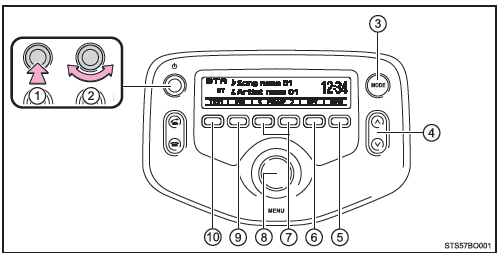
- Power
- Volume
- Changing the audio source/playback
- Selecting a track, fast-forwarding or rewinding
- Random or back button
- Repeat
- Selecting an album
- Selecting a track or selecting items
- Playing/pausing
- Displaying a text message
Selecting an album
Press (<Folder) or
 (Folder>) to select the desired album.
Selecting a track
Turn the "MENU" knob or press the " " o "
 " button to select the desired track.
Fast-forwarding and rewinding tracks
Press and hold the " " o "
 ".
Repeat
Pressing (RPT) button to change the modes in the following order: Track repeat → Album repeat → Off
Random playback
Pressing (RDM) button to change the modes in the following order: Album random → All tracks random → Off
Playing and pausing tracks
Press (
 ).
Changing the display
Press (Text) to show or hide the album title.
If there is text that is not displayed, the symbol appears. .
Press and hold the button to display the remaining text.
■ Bluetooth® audio system features Depending on the type of portable player connected to the system, some functions may not be available.
■ Display
Test yourself
A quick Toyota Aygo quiz: every answer comes with an explanation and a link to the manual page.