Using the radio
Radio Operation
Press the "MODE" button until "AM", "FM" or "DAB" (if equipped) is displayed.
Type A
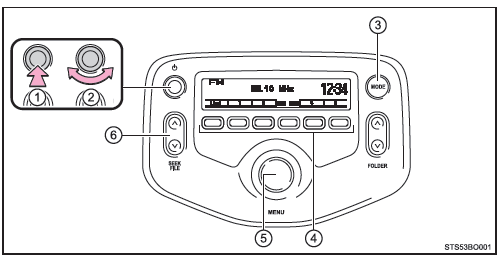
- Power
- Volume
- Changing the Audio Source
- Station Selectors
- Adjusting the Frequency or Selecting Entries
- Frequency Search
Type B
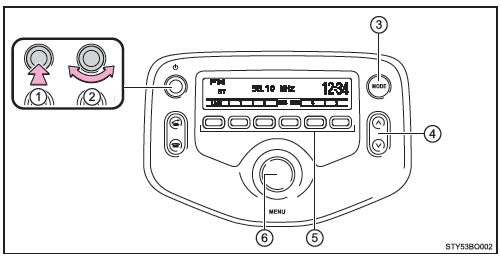
- Power
- Volume
- Changing the Audio Source
- Frequency Search
- Station Selectors
- Adjusting the Frequency or Selecting Entries
Selecting Preset Stations
- Search for the desired stations by turning the "MENU" knob or pressing the "
 " or "
 " on the "SEEK/FILE" button (type A) or pressing the "
 " o "
 " button (type B).
- Press and hold the preset button of the desired station until you hear a beep.
Using the Station List (FM Mode Only)
■ Updating the station list
- Press
 (List).
The station list will be displayed.
 (Update) to update the list.
"Updating" is displayed during the search, then the available stations are listed on the display.
To cancel the update process, press (Back).
■ Selecting a station from the station list
- Press
 (List).
The station list will be displayed.
 (Back).
RDS (Radio Data System)
This feature allows the radio to continue receiving the same station.
■ Listening to stations of the same network
- Press the "MENU" button.
- Turn the knob to "Radio" and press it.
- Turn the knob until the desired mode is displayed: "FM AF", "Region code" or "DAB AF" (if equipped).
- Press the knob to select "On" or "Off".
FM AF On/DAB AF On mode (if equipped): Among all stations in the same network, the station with the strongest reception is selected.
Region Code mode on: Among all stations in the same network, the station with the strongest reception that broadcasts the same program is selected.■ Traffic information
- Press the "MENU" button.
- Turn the knob to "Radio" and press it.
- Turn the knob to the "FM TA" mode.
- Press the knob to select "On" or "Off".
TP mode: When a broadcast with a traffic information signal is received, the system automatically switches to the traffic information.
When the traffic information ends, the system returns to the previous station.
TA mode: When a broadcast with a traffic information signal is received, the system automatically switches to the traffic information. In FM mode, the system remains muted unless traffic information is broadcast.
When the traffic information ends, the audio system returns to the previously selected mode.■ EON (Enhanced Other Network) system (for the traffic announcement function) If the RDS station (with EON data) you are listening to is not broadcasting a traffic information program and the audio system is in TA (Traffic Announcement) mode, the radio will automatically switch to a station broadcasting a traffic information program in the EON AF frequency list as soon as traffic information begins.
■ When the battery is disconnected Preset stations are erased.
■ Reception sensitivity
- Due to constant changes in antenna position, varying signal strengths, and the proximity of objects such as trains, transmitters, etc., it is difficult to always maintain perfect radio reception.
- The radio antenna is mounted on the roof. The antenna can be removed from the base by unscrewing it.
■ DAB (Digital Audio Broadcast) radio (if equipped) The optional antenna and radio tuner are required to use the Digital Audio Broadcast (DAB) system.
NOTE
■ To prevent damage, remove the antenna in the following cases
- The antenna touches the garage ceiling.
- A roof cover is to be fitted.
Test yourself
A quick Toyota Aygo quiz: every answer comes with an explanation and a link to the manual page.