Installation
INSTALLATION
PROCEDURE
1. INSTALL NAVIGATION ECU BRACKET NO. 2
(a) Engage the guides to temporarily install the navigation ECU bracket No. 2. |
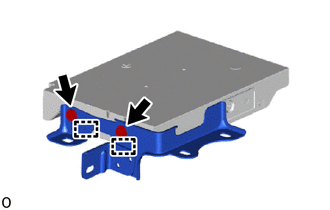 |
(b) Install the navigation ECU bracket No. 2 with the 2 bolts to the navigation ECU.
2. INSTALL NAVIGATION ECU BRACKET NO. 1
(a) Engage the guides to temporarily install the navigation ECU bracket No. 1. |
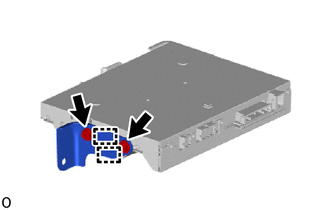 |
(b) Install the navigation ECU bracket No. 1 with the 2 bolts to the navigation ECU.
3. INSTALL ANTENNA CABLE SUB-ASSEMBLY
(a) Engage the clips to install the antenna cable sub-assembly. |
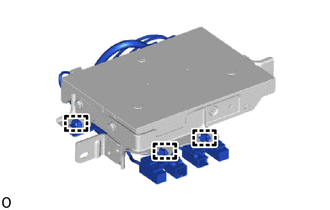 |
(b) Connect the 3 connectors.
4. INSTALL NAVIGATION ECU WITH BRACKET
(a) Connect the connector.
(b) Install the navigation ECU with bracket using the 2 nuts.
Torque:
12 N·m {122 kgf·cm, 9 ft·lbf}
(c) Connect the 4 connectors.
5. INSTALL LOWER CENTER INSTRUMENT FINISH PANEL SUB-ASSEMBLY OF INSTRUMENT CLUSTER
Click here
6. INSTALL INSTRUMENT PANEL SUB-ASSEMBLY
Click here
7. INSTALL LOWER CENTER INSTRUMENT PANEL FINISH PANEL
Click here
8. INSTALL LOWER INSTRUMENT PANEL COVER SUB-ASSEMBLY NO. 1
Click here
9. INSTALL LEFT COWL SIDE TRIM BOARD
Click here
10. INSTALL FRONT DOOR SCUFF PLATE LH
Click here
11. INSTALL INSTRUMENT CLUSTER FINISH PANEL GARNISH SUB-ASSEMBLY
Click here