Audio & visual system
Steering pad switch LH
In this manual: Audio & visual system
22steps
~132min
4/5difficulty
Done 0 of 22
REPLACEMENT
HINT:
- COMPONENTS:
- Installation is in the reverse order of removal.
- PRECAUTION
- DISCONNECT BATTERY NEGATIVE TERMINAL
- REMOVE STEERING WHEEL COVER LOWER No.2 TMC MADE TMMK MADE
- REMOVE STEERING WHEEL COVER LOWER No.3 TMC MADE TMMK MADE
- REMOVE HORN BUTTON ASSY
- REMOVE STEERING PAD SWITCH LH (4 SPOKE STEERING WHEEL ASSY)
- Disconnect the connector.
- Disconnect the connector of cruise control main switch.
- Remove the screw.
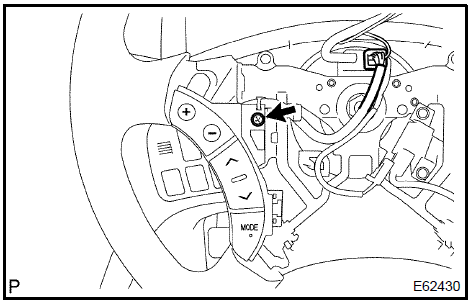
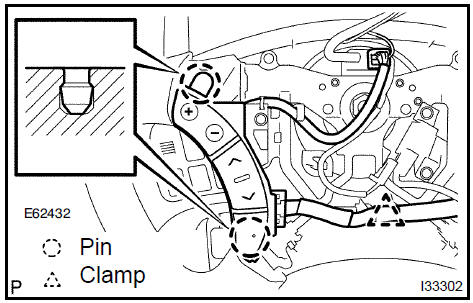
- w/o steering pad switch RH: Release the 2 pins and remove the steering pad switch LH.

- w/ steering pad switch RH: Remove the clamp.
- w/ steering pad switch RH: Release the 2 pins and release the steering pad switch LH from steering wheel.
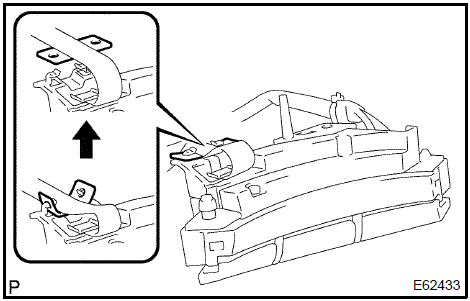
- w/ steering pad switch RH: Release the tab of steering pad switch cable from steering pad switch LH as shown in the illustration.
- w/ steering pad switch RH: Disengage the 2 claws as shown in the illustration and open the latch on the top of the connector.
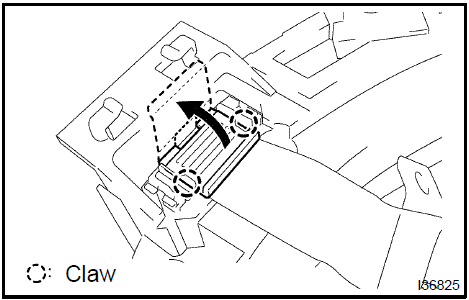
- w/ steering pad switch RH: Pull out the connector while pinching the latch with fingers and disconnect the steering pad switch cable from the steering pad switch LH.
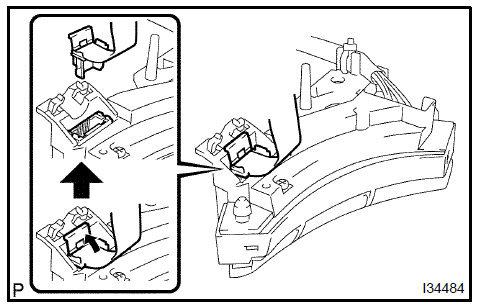
- Disconnect the connector.
- Remove the screw.
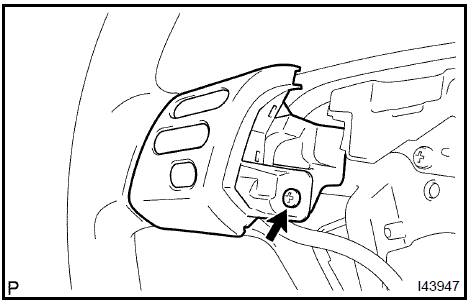
- Disengage the 2 claws.
- Remove the steering pad switch LH.

- INSTALL HORN BUTTON ASSY
- CONNECT BATTERY NEGATIVE TERMINAL
- INSPECT SRS WARNING LIGHT
Test yourself
A quick Toyota Camry quiz: every answer comes with an explanation and a link to the manual page.
Was this page helpful?