Diagnostics
Although system is powered,cd cannot be played
In this manual: Diagnostics
12steps
~72min
3/5difficulty
Done 0 of 12
Wiring diagram Inspection procedure 1 Check if a proper cd is inserted


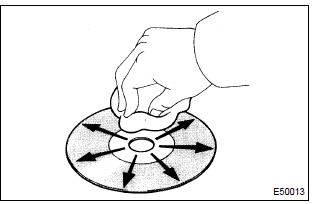


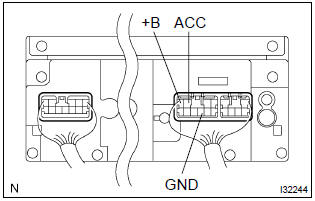




- Check that a proper cd is inserted.
- Make sure that the cd is a normal audio cd, and that there is no deformation, flaw, stain, burr and other defects on the cd.
Standard: normal audio cd.
Reference:
- translucent or different–shaped cd cannot be played.
- Cd–rom for personal computers (with music recorded in) and recorded cd–r may not be played.
- Playing an 3.2 In. (8–Cm) cd does not require an adapter.
- Check that a proper cd is inserted.
- Check whether or not the cd is inserted upside down.
Standard: not upside down.


- Disk cleaning
- if the disk gets dirty, clean the disk by wiping the surface from the center to outside in the radial directions with a soft cloth.
: do not use a conventional record cleaner or anti–static preservative.
- Replace the cd with another and recheck.
- Replace the faulty cd with the normal one to see if the same trouble occurs again.
Standard: malfunction disappear.


- Check if the radio auto–search function properly.
- Perform the auto–research of the radio and check that the operation is normal.
Standard: malfunction disappear.


- Did the temperature in the cabin change rapidly?
- Check whether or not the rapid temperature change occurred in the cabin. Standard: the rapid temperature change occurred.
Reference: the rapid temperature change creates condensation inside the cd player, which may disable playing cd.


- Check that the continuity between terminals at each condition, as shown in the chart.
Standard:
- Check that the voltage between terminals at each condition, as shown in the chart.
Standard:
Test yourself
A quick Toyota Corolla quiz: every answer comes with an explanation and a link to the manual page.
Was this page helpful?