Wiring diagramInspection procedure1 Check if radio auto–search functions properly
Check if the radio auto–search function properly.
Perform the auto–research of the radio and check that the operation is normal.
Standard: malfunction disappear.
2 Press ”eject” and check operation
Press ”eject”and check the operation.
Press the cd eject switch of the radio receiver assembly for 2 sec or more to see if the cd is ejected. Standard: cd is ejected. Reference: if the cd is not ejected, send the vehicle for repair.
Do not try to drag it out by force.
3 Check if a proper cd is inserted
Check that a proper cd is inserted.
Check that in what conditions the sound skipping occurs.
Standard: driving on the bad road.
4 Replace cd with another and recheck
Replace the cd with another and recheck.
Check the installation condition of the radio receiver assembly.
Standard: installed properly.
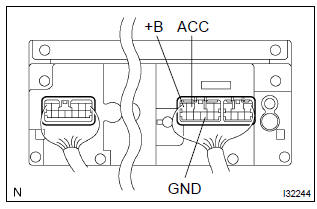
5 Inspect radio receiver assy(+b, acc, gnd)
Check that the continuity between terminals at each condition, as shown in the chart.
Standard:
Check that the voltage between terminals at each condition, as shown in the chart.
Standard:
Repair or replace harness or connector
?
Test yourself
A quick Toyota Corolla quiz: every answer comes with an explanation and a link to the manual page.