Making a call
Once a bluetooth® phone is registered, you can make a call using the following procedure:
Dialing- Display the phone screen.
- Select the "dial pad" tab and enter a phone number
 .
To delete the input phone number, select .For the first digit, you can enter "+" by selecting "ƒx" for a while.
- Press the
 switch on the
steering wheel or select .
You can dial a number from the contact data imported from your cellular phone. The system has one contact for each registered phone. Up to 2500 contacts may be stored in each contact.
- Display the phone screen.
- Select "contacts" tab.
- Choose the desired contact to call from the list.
- Choose the number and then press the switch on the steering
wheel or select .
You can transfer the phone numbers in a bluetooth® phone to the system.
Operation methods differ between pbap (phone book access profile) compatible and pbap incompatible bluetooth® phones. If the cellular phone does not support either pbap or opp (object push profile) service, you cannot transfer contacts.
- Press the switch on the steering wheel.
If the phonebook is empty, a message will be displayed.
- for a pbap compatible bluetoothr phone and "automatic transfer" is off
- Select the desired item.
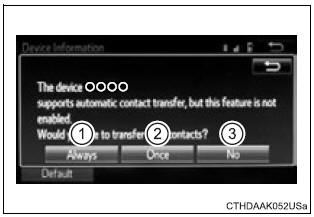
- Select to transfer new contacts from a cellular phone, select “always” and then enable “automatic transfer”.
- Select to transfer all the contacts from a connected cellular phone only once.
- Select to cancel transferring.
- For a pbap incompatible but opp compatible bluetooth® phone
- Select the desired item.
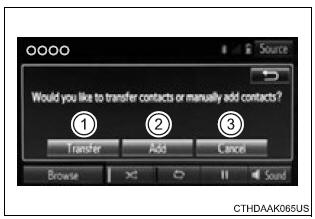
- Select to transfer the contacts from the connected cellular phone.
- Follow the steps in "update contacts from phone" from "step2".
You can make a call using numbers registered in the contact.
- Display the phone screen.
- Select "favorites" tab.
- Select the desired number to make a call.
You can make a call using the call history, which has the 3 functions below.
 : Calls which you missed
 : Calls which you received
 : Calls which you made
- Display the phone screen.
- Select "call history" tab.
- Select or the desired entry from the list.
- when is selected
- Check that the "call" screen is displayed.
- when the desired contact is selected
- Select the desired number.
- Check that the "call" screen is displayed.
- If you make a call to or receive a call from a number registered in the contact, the name is displayed in the call history.
- If you make multiple calls to the same number, only the last call made is displayed in the call history.
- You may not be able to make international calls, depending on the mobile phone in use.