Audio system
Contact/call history settings
In this manual: Audio system
13steps
~78min
3/5difficulty
Done 0 of 13
The contact can be transferred from a bluetooth® phone to the system.
The contact also can be added, edited and deleted.
The call history can be deleted and contact and favorites can be changed.
- Display the "phone/message settings" screen.
- Select "contact/call history settings".
- Select the desired item to be set.
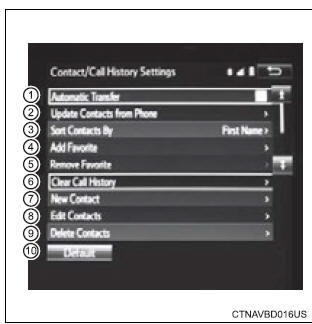
- For pbap compatible bluetoothr phones, select to set automatic contact/history transfer on/off. When set to on, the phone's contact data and history are automatically transferred.
- Select to update contacts from the connected phone.
- Select to sort contacts by the first name or last name field.
- Select to add contacts to the favorites list.
- Select to delete contacts from the favorites list.
- Select to clear contacts from the call history.*
- Select to add new contacts to the contact list.*
- Select to edit contacts in the contact list.*
- Select to delete contacts from the contact list.*
- Select to reset all setup items.
*: For pbap compatible bluetoothr phones only, this function is available when "automatic transfer" is set to off.
Was this page helpful?