Maintenance and care
Electronic key battery
In this manual: Maintenance and care
~1min read
Replace the battery with a new one if it is discharged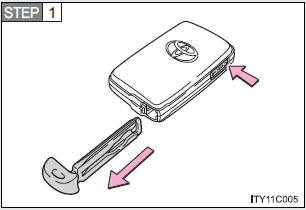

.
- You will need the following items:
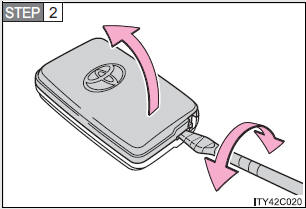
- Flathead screwdriver (To prevent damage to the key, cover the tip of the screwdriver with rag.)
- Small Phillips-head screwdriver
- Lithium battery CR1632
- Replacing the battery
Take out the mechanical key.
Remove the cover.
Remove the depleted battery.
Insert a new battery with the “+” terminal facing up.
- If the electronic key battery is discharged
The following symptoms may occur.
- The smart key system and wireless remote control will not function properly.
- The operational range is reduced.
- Use a CR1632 lithium battery
- Batteries can be purchased at your Toyota dealer, jewelers, or camera stores.
- Replace only with the same or equivalent type recommended by a Toyota dealer.
- Dispose of used batteries according to the local laws.
- Removed battery and other parts
These parts are small and if swallowed by a child, they can cause choking.
Keep away from children. Failure to do so could result in death or serious injury.
NOTICE- For normal operation after replacing the battery
Observe the following precautions to prevent accidents.
- Always work with dry hands.
Moisture may cause the battery to rust.
- Do not touch or move any other components inside the electronic key.
- Do not bend the battery terminals.
Test yourself
A quick Toyota Land Cruiser quiz: every answer comes with an explanation and a link to the manual page.
Was this page helpful?