Interior features
Operating a Bluetooth® enabled portable player
In this manual: Interior features
~1min read
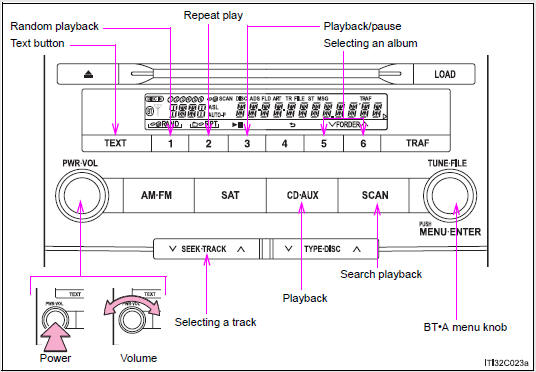
To select the desired album, press  (∨) or
 (∧).
Press “∧” or “∨” on  to select the desired track.
To play or pause a track, press  (
 ).
To fast-forward or rewind, press and hold “∧” or “∨” on  until you hear a beep.
Press  (RAND).
To cancel, press  (RAND) again.
Press  (RPT).
To cancel, press  (RPT) again.
Press  .
To cancel, press  again.
Press  .
Each time the button is pressed, the display changes in the following order: Elapsed time → Album title → Track title → Artist name
Using the steering wheel audio switches- Bluetooth® audio system functions
Depending on the portable player that is connected to the system, certain functions may not be available.
- Display
- Error messages
“Memory Error”: This indicates a problem in the system.
Test yourself
A quick Toyota Land Cruiser quiz: every answer comes with an explanation and a link to the manual page.
Was this page helpful?