Rear air conditioning system
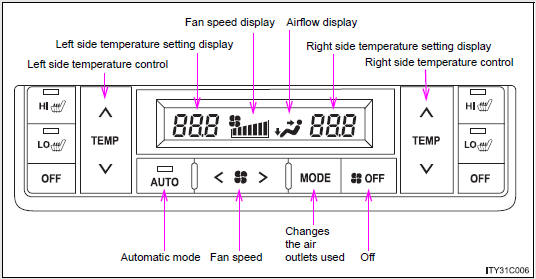
Press  .
The air conditioning system will begin to operate. Air outlets and fan speed are automatically adjusted according to the temperature setting.
STEP 2Press “∧” to increase the temperature and “∨” to decrease the temperature on  .
The temperature for the right-hand and left-hand rear seats can be set separately.
Adjusting the settings- Adjusting the temperature setting
Press “∧” to increase the temperature and “∨” to decrease the temperature on .
The temperature for the right-hand and left-hand rear seats can be set separately.
- Adjusting the fan speed
Press “>” (increase) or “<” (decrease) on  .
The fan speed is shown on the display. (7 levels) Press  to turn the fan off.
- Changing the air outlets
Press  .
The air outlets switch each time the button is pressed.
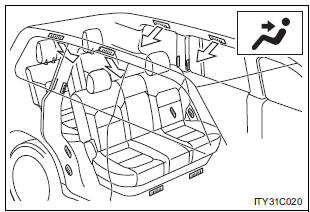
Air flows to the upper body.
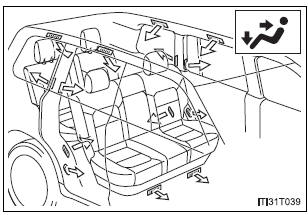
Air flows to the upper body and feet.
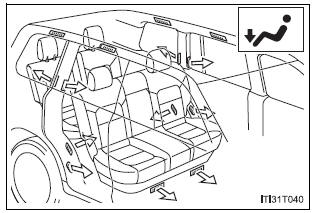
Air flows to the feet.
Adjusting the position and opening and closing the air outlets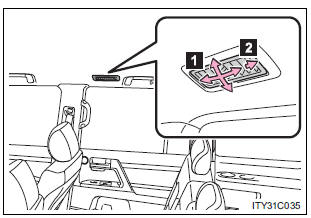
- Direct air flow to the left or right, up or down.
- Turn the knob fully to the back of the vehicle to close the vent.
NOTICE To prevent battery discharge Do not leave the air co
Test yourself
A quick Toyota Land Cruiser quiz: every answer comes with an explanation and a link to the manual page.