Operation of each component
Driving position memory
In this manual: Operation of each component
7steps
~42min
2/5difficulty
Done 0 of 7
Your preferred driving position (the position of the driver’s seat) can be recorded and recalled by pressing a button.
Two different driving positions can be recorded into memory.
Recording procedure- Check that the shift lever is in p.
- Turn the engine switch to the “on” position (vehicles without a smart key system) or ignition on mode (vehicles with a smart key system).
- Adjust the driver’s seat to the desired positions.
- While pressing the “set” button, press button “1” or “2” until the buzzer sounds.

If the selected button has already been preset, the previously recorded position will be overwritten.
Recall procedure- Check that the shift lever is in p.
- Turn the engine switch to the “on” position (vehicles without a smart key system) or ignition on mode (vehicles with a smart key system).
- Press one of the buttons for the driving position you want to recall until the buzzer sounds.
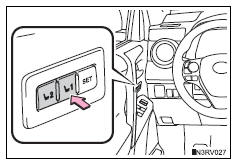
Perform any of the following:
- Press the “set” button.
- Press button “1” or “2”.
- Operate any of the seat adjustment switches.
Recorded seat positions can be activated up to 180 seconds after the driver’s door is opened and another 60 seconds after it is closed again.
If the battery is disconnectedThe memorized positions are erased.
Test yourself
A quick Toyota RAV4 quiz: every answer comes with an explanation and a link to the manual page.
Was this page helpful?