Memory recall function (vehicles with a smart key system)
Each electronic key can be registered to recall your preferred driving position.
Registering procedureRecord your driving position to button “1” or “2” before performing the following: carry only the key you want to register, and then close the driver’s door.
If 2 or more keys are in the vehicle, the driving position cannot be recorded properly.
- Check that the shift lever is in p.
- Turn the engine switch to ignition on mode.
- Recall the driving position that you want to record.
- While pressing the recalled button, press and hold the door lock switch (either lock or unlock) until the buzzer sounds.
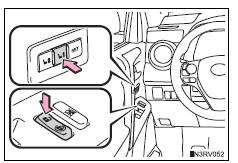
If the button could not be registered, the buzzer sounds continuously for approximately 3 seconds.
Recall procedureCarry the electronic key that has been registered to the driving position, and then unlock and open the driver’s door using the smart key system or wireless remote control.
The driving position will move to the recorded position.
If the driving position is in a position that has already been recorded, the seat will not move.
Cancelation procedureCarry only the key you want to cancel and then close the driver’s door.
If 2 or more keys are in the vehicle, the driving position cannot be canceled properly.
- Turn the engine switch to ignition on mode.
- While pressing the “set” button, press and hold the door lock switch (either lock or unlock) until the buzzer sounds twice.
- Different driving positions can be registered for each electronic key. Therefore, the driving position that is recalled may be different depending on the key being carried.
- If a door other than the driver’s door is unlocked with the smart key system, the driving position cannot be recalled. In this case, press the driving position button which has been set.
Take care during seat adjustment so that the seat does not strike the rear passenger or squeeze your body against the steering wheel.
Test yourself
A quick Toyota RAV4 quiz: every answer comes with an explanation and a link to the manual page.