Engine (ignition) switch (vehicles with a smart key system)
- Check that the parking brake is set.
- Check that the shift lever is set in p.
- Firmly depress the brake pedal.
The smart key system indicator light (green) will turn on. If the indicator light does not turn on, the engine cannot be started.
- Press the engine switch.
The engine will crank until it starts or for up to 30 seconds, whichever is less.
Continue depressing the brake pedal until the engine is completely started.
The engine can be started from any engine switch mode.

Stopping the engine
- Stop the vehicle.
- Shift the shift lever to p.
- Set the parking brake
- Press the engine switch.
- Release the brake pedal and check that the smart key system indicator light (green) is off.
Modes can be changed by pressing the engine switch with the brake pedal released. (The mode changes each time the switch is pressed.)
Off*The emergency flashers can be used.
The smart key system indicator light (green) off.
Accessory modeSome electrical components such as the audio system can be used.
The smart key system indicator light (green) flashes slowly.
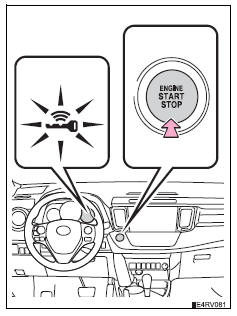
Ignition on mode
All electrical components can be used.
The smart key system indicator light (green) flashes slowly.
*: If the shift lever is in a position other than p when turning off the engine, the engine switch will be turned to accessory mode, not to off.
When stopping the engine with the shift lever in a position other than pIf the engine is stopped with the shift lever in a position other than p, the engine switch will not be turned off but instead be turned to accessory mode. Perform the following procedure to turn the switch off:
- Check that the parking brake is set.
- Shift the shift lever to p.
- Check that the smart key system indicator light (green) flashes slowly and then press the engine switch once.
- Check that the smart key system indicator light (green) is off.
If the vehicle is left in accessory or ignition on mode (the engine is not running) for more than an hour with the shift lever in p, the engine switch will automatically turn off. However, this function cannot entirely prevent battery discharge. Do not leave the vehicle with the engine switch in accessory or ignition on mode for long periods of time when the engine is not running.
Electronic key battery depletion Conditions affecting operation Notes for the entry function If the engine does not start- The engine immobilizer system may not have been deactivated. („_P. 76) Contact your toyota dealer.
- The steering lock may not have been canceled.
After turning the engine switch off and opening and closing the doors, the steering wheel will be locked due to the steering lock function. Operating the engine switch again automatically cancels the steering lock.
When the steering lock cannot be releasedThe smart key system indicator light (green) will flash quickly.
Check that the shift lever is set in p. Press the engine switch while turning the steering wheel left and right. 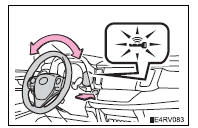
Steering lock motor overheating prevention
To prevent the steering lock motor from overheating, the motor may be suspended if the engine is turned on and off repeatedly in a short period of time.
In this case, refrain from running the engine. After about 10 seconds, the steering lock motor will resume functioning.
When the smart key system indicator light flashes in yellowThe system may be malfunctioning. Have the vehicle inspected by your toyota dealer immediately.
If the electronic key battery is depleted Operation of the engine switchWhen operating the engine switch, one short, firm press is enough. If the switch is pressed improperly, the engine may not start or the engine switch mode may not change. It is not necessary to press and hold the switch.
If the smart key system has been deactivated in a customized setting Caution When starting the engineAlways start the engine while sitting in the driver’s seat. Do not depress the accelerator pedal while starting the engine under any circumstances.
Doing so may cause an accident resulting in death or serious injury.
Caution while drivingIf engine failure occurs while the vehicle is moving, do not lock or open the doors until the vehicle reaches a safe and complete stop. Activation of the steering lock in this circumstance may lead to an accident, resulting in death or serious injury.
Stopping the engine in an emergencyIf you want to stop the engine in an emergency while driving the vehicle, press and hold the engine switch for more than 2 seconds, or press it briefly 3 times or more in succession.
However, do not touch the engine switch while driving except in an emergency.
Turning the engine off while driving will not cause loss of steering or braking control, but the power assist to these systems will be lost. This will make it more difficult to steer and brake, so you should pull over and stop the vehicle as soon as it is safe to do so.
Notice To prevent battery discharge- Do not leave the engine switch in accessory or ignition on mode for long periods of time without the engine running.
- If the smart key system indicator light (green) is illuminated, the engine switch is not off. When exiting the vehicle, always check that the engine switch is off.
- Do not stop the engine when the shift lever is in a position other than p. If the engine is stopped in another shift lever position, the engine switch will not be turned off but instead be turned to accessory mode. If the vehicle is left in accessory mode, battery discharge may occur.
- Do not race a cold engine.
- If the engine becomes difficult to start or stalls frequently, have your vehicle checked by your toyota dealer immediately.
If the engine switch seems to be operating somewhat differently than usual, such as the switch sticking slightly, there may be a malfunction. Contact your toyota dealer immediately.
Test yourself
A quick Toyota RAV4 quiz: every answer comes with an explanation and a link to the manual page.