Garage door opener
The garage door opener can be programmed using the HomeLink to operate garage doors, gates, entry doors, door locks, home lighting systems, security systems, and other devices.
■HomeLink programming procedure
The programming procedures can also be found at the following URL.
System components
The HomeLink wireless control system in your vehicle has 3 buttons which can be programmed to operate 3 different devices. Refer to the programming methods on the following pages to determine the method which is appropriate for the device.
Vehicles with auto anti-glare inside rear view mirror
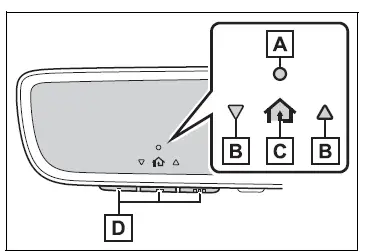
- HomeLink indicator light
- Garage door operation indicators
- HomeLink icon
Illuminates while HomeLink is operating.
- Buttons
Vehicles with Digital Rearview Mirror

- HomeLink indicator light
Illuminates above each button selected.
- HomeLink icon
- Garage door operation indicators
- HomeLink logo
Appears while HomeLink is operating.
When the HomeLink button is pressed, the logo disappears even while the HomeLink is operating.
- Setting icon
Press the menu button to change the setting.
- Menu buttons
- HomeLink buttons
■Codes stored in the HomeLink memory
- The registered codes are not erased even if the battery cable is disconnected.
- If learning failed when registering a different code to a HomeLink button that already has a code registered to it, the already registered code will not be erased.
WARNING
■When programming a garage door or other remote control device
The garage door or other device may operate, so ensure people and objects are out of danger to prevent potential harm.
■Conforming to federal safety standards
Do not use the HomeLink compatible transceiver with any garage door opener or device that lacks safety stop and reverse features as required by federal safety standards.
This includes any garage door that cannot detect an interfering object. A door or device without these features increases the risk of death or serious injury.
■When operating or programming HomeLink
Never allow a child to operate or play with the HomeLink buttons.
Test yourself
A quick Toyota RAV4 quiz: every answer comes with an explanation and a link to the manual page.