Wireless charger (if equipped)
A portable device can be charged by just placing Qi standard wireless charge compatible portable devices according to the Wireless Power Consortium, such as smartphones and mobile batteries, etc., on the charge area.
This function cannot be used with portable devices that are larger than the charging tray.
Also, depending on the portable device, it may not operate as normal. Please read the operation manual for portable devices to be used.
■ The "Qi" logo
The "Qi" logo is a trademark of the Wireless Power Consortium.

■ Name for all parts
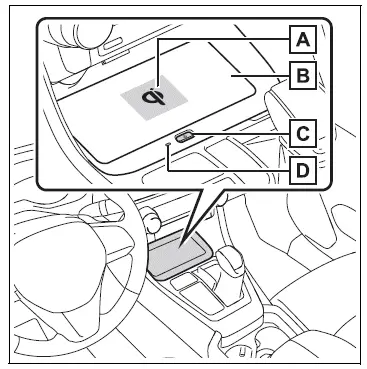
- Charge area*
- Charging tray
- Power supply switch
- Operation indicator light
*: Portable devices and wireless chargers contain charging coils.
The charging coil in the wireless charger can be moved within the charge area near the center of the charging tray. If the charging coil inside a portable device is detected in the charge area, the charging coil inside the wireless charger will move toward it and start charging. If the charging coil inside a portable device moves outside of the charge area, charging will automatically stop.
If 2 or more portable devices are placed on the charging tray, their charging coils may not be properly detected and they may not be charged.
■ Using the wireless charger
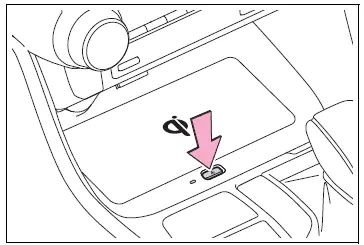
1. Press the power supply switch of the wireless charger.
Switches on and off with each press of the power supply switch.
When turned on, the operation indicator light (green) comes on.
Even with the engine off, the on/off state of the power supply switch is memorized.
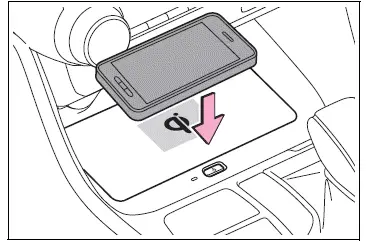
2. Place the portable device on the charging tray Place the charging side of the portable device down with the center of the device in the center of the charge area. Depending on the portable device, its charging coil may not be in the center of the device. In this case, place the portable device so that its charging coil is centered in the charging area.
When charging, the operation indicator light (orange) comes on.
If charging is not occurring, try placing the portable device as close to the center of the charging area as possible. If charging is not performed, the operation indicator light will slowly illuminate in green and orange alternatively and a sound of charging coil operation may be heard repeatedly.
When charging is complete, the operation indicator light (green) comes on.
■ Recharging function
- When charging is complete and after a fixed time in the charge suspension state, charging restarts.
- If a portable device is moved significantly within the charging area, the charging coil may disconnect and charging may temporarily be stopped. However, if a charging coil is detected within the charging area, the charging coil inside the wireless charger will move near the other coil and charging will resume.
■ Rapid charging function
- The following portable devices support rapid charging.
- Portable devices compliant with WPC Ver1.2.4 and compatible with rapid charging
- iPhone's with an iOS version that supports 7.5 W charging (iPhone 8 and later models)
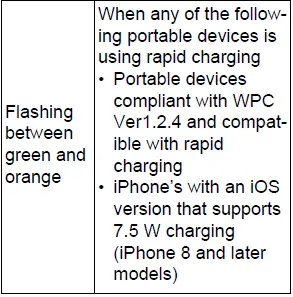
- To switch to the rapid charging function, press the power supply switch 3 times while charging. When rapid charging is possible, the operation indicator light will switch from orange to flashing between green and orange.
- When charging is complete, the rapid charging function will stop. Switch again to the rapid charging function to use rapid charging again.
■ Lighting conditions of operation indicator light
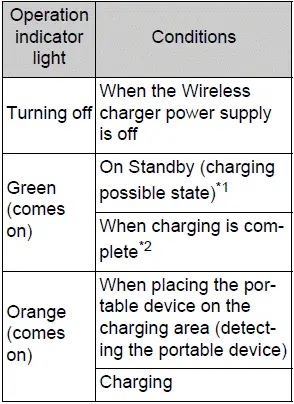
*1:Charging power will not be output during standby. A metallic object will not be heated, if it is placed on the charging tray in this state.
*2:Depending on the portable device, there are cases where the operation indicator light will continue being lit up orange even after the charging is complete.
■ When the operation indicator light flashes
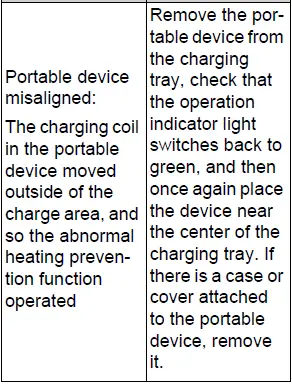
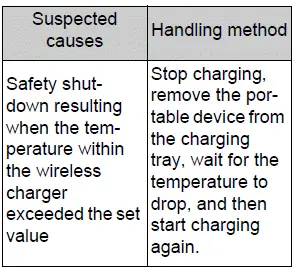
When an error occurs, the operation indicator light flashes an orange color.
Handle the error based on the following tables.
- Flashing repeatedly once every second (Orange)

- Repeatedly flashes 3 times continuously (Orange)

- Repeatedly flashes 4 times continuously (Orange)
■The wireless charger can be operated when
The engine switch is in ACC or ON.
■Usable portable devices
- Qi standard wireless charge standard can be used on compatible devices. However, not all Qi standard devices and compatibility are guaranteed.
- Starting with mobile phones and smartphones, it is aimed for low power electrically supplied portable devices of no more than 5W.
- However, charging exceeding 5 W is supported by the following portable devices.
- Charging at 7.5 W or less is supported by iPhone's that support 7.5 W charging.
- Charging at 10 W or less is supported by portable devices compliant with EPP output as defined by WPC standard Ver1.2.4.
■Using the smart key system
If the smart key system detects the key while a device is being charged, charging will be temporarily stopped.
■When covers and accessories are attached to portable devices
Do not charge in situations where cover and accessories not able to handle Qi are attached to the portable device. Depending on the type of cover (including the certain genuine manufacture parts) and accessory, it may not be possible to charge. When charging is not performed even with the portable device placed on the charge area, remove the cover and accessories.
■While charging, noise enters the AM radio
- Turn off the wireless charger and confirm that the noise has decreased. If the noise decreases, continuously pushing the power supply switch of the wireless charger for 2 seconds, the frequency of the charger can be changed and the noise can be reduced. Also, on that occasion, the operation indicator light will flash orange 2 times.
- iPhone's use a particular frequency for rapid charging.
Depending on the iOS version, rapid charging may not be performed while switching frequencies.
■Important points of the wireless charger
- If the electronic key cannot be detected within the vehicle interior, charging cannot be done.
When the door is opened and closed, charging may be temporarily suspended.
- When charging, the wireless charging device and portable device will get warmer, however this is not a malfunction.
When a portable device gets warm while charging, charging may stop due to the protection function on the portable device side. In this case, when the temperature of the portable device drops significantly, charge again.
The fan may start operating to lower the temperature inside the wireless charger, however this is not a malfunction.
■Operation sounds
A buzzing noise may be heard when pressing the power supply switch to turn the power supply on, when turning the engine switch to ACC or ON while the wireless charger power supply is on, or when detecting a portable device. However, this is not a malfunction.
■If the smartphone OS has been updated
If the smartphone OS has been updated to a newer version, its charging specifications may have changed significantly. For details, check the information on the manufacturer's website.
■Trademark information
iPhone is a trademark of Apple Inc., registered in the U.S. and other countries.
WARNING
■Caution while driving
When charging a portable device, for safety reasons, the driver should not operate the main part of the portable device while driving.
■Caution while in motion
Do not charge lightweight devices such as wireless headphones while in motion. These devices are very light and may be ejected from the charging tray, which may lead to unforeseen accidents.
■Caution regarding interference with electronic devices
People with implantable cardiac pacemakers, cardiac resynchronization therapy-pacemakers or implantable cardioverters, as well as any other electrical medical device, should consult their physician about the usage of the wireless charger.
■To prevent malfunctions or burns
Observe the following precautions.
Failure to do so may result in a equipment failure and damage, catch fire, burns due to overheat or electric shock.
- Do not insert any metallic objects between the charge area and the portable device while charging
- Do not attach an aluminum sticker or other metallic object to the charge area
- Do not attach an aluminum sticker or other metallic object to the side of the portable device (or to its case or cover) that touches the charge area
- Do not use the charging tray as a small storage space
- Do not subject to a strong force or impact
- Do not disassemble, modify or remove
- Do not charge devices other than specified portable devices
- Keep away from magnetic items
- Do not charge devices if the charge area is covered in dust
- Do not cover with a cloth or similar material
NOTICE
■Situations in which the function may not operate normally
Devices may not be charged normally in the following situations.
- The portable device is fully charged
- The portable device is being charged with a cable connected
- There is foreign matter between the charge area and portable device
- Charging has caused the portable device to heat up
- The temperature around the charging tray is 95ºF (35ºC) or higher, such as in extreme heat
- The portable device is placed with its charging side facing up
- When the charging coil for the portable device is misaligned from the charge area (In particular, small portable devices such as foldable devices may be misaligned from the charging area while driving)
- The portable device is larger than the charging tray
- The camera lens protrudes 3 mm (0.12 in) or more from the surface of the portable device
- The vehicle is in an area where strong electrical waves or noise are emitted, such as near a television tower, power plant, gasoline station, broadcasting station, large display, airport, etc.
- Any of the following objects that is 0.08 in (2 mm) or thicker is between the charging side of the portable device and the charge area
- Thick cases or covers
- Thick decorations
- Accessories, such as finger rings, straps, etc.
- When the portable device is in contact with, or is covered by any of the following metallic objects:
- A card that has metal on it, such as aluminum foil, etc.
- A pack of cigarettes that includes aluminum foil
- A wallet or bag that is made of metal
- Coins
- A heating pad
- CDs, DVDs or other media
- A metal accessory
- A case or cover made of metal
- Casing which has magnet in it on the charging side of the portable device
- Electric wave type wireless remote controls are being used nearby
- The electronic key is not inside the vehicle
- 2 or more portable devices are placed on the charging tray at the same time
If charging is abnormal or the operation indicator light continues to flash for any other reason, the wireless charger may be malfunctioning.
Contact your Toyota dealer.
■To prevent malfunctions and data corruptions
- When charging, bringing a credit, or other magnetic card, or magnetic storage media close to the charge area may clear any stored data due to magnetic influence. Also, do not bring a wristwatch or other precision instrument close to the charge area since doing so may cause it to malfunction.
- Do not charge with a non-contact IC card such as a transportation system IC card inserted between the charging side of a portable device and the charge area. The IC chip may become extremely hot and damage the portable device or IC card. Be especially careful not to charge a portable device inside a case or cover with a non-contact IC card attached.
- Do not leave portable devices inside the vehicle. The inside of the vehicle can become hot in extreme heat, which could cause a malfunction.
■To prevent battery discharge
Do not use the wireless charger for a long period of time when the engine is stopped.
Test yourself
A quick Toyota RAV4 quiz: every answer comes with an explanation and a link to the manual page.