Rear view monitor system
The screen illustrations used in this text are intended as examples, and may differ from the image that is actually displayed on the screen.
The rear view monitor system will activate when the shift lever is in r.
If you move the lever out of r, the rear view monitor system will be deactivated.
When the shift lever is shifted to the r position and any mode button (such as “menu”/“apps”) is pressed, the rear view monitor system is canceled, and the screen is switched to the mode of the button that was pressed.
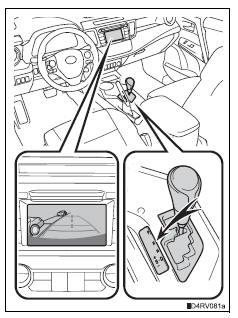
Using the rear view monitor system Screen description
- Vehicles without a smart key system
The rear view monitor system screen will be displayed if the shift lever is shifted to r while the engine switch is in the “on” position.
- Vehicles with a smart key system
The rear view monitor system screen will be displayed if the shift lever is shifted to r while the engine switch is in ignition on mode.
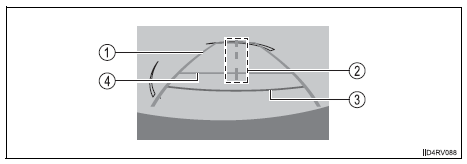
- Vehicle width extension guide line
The line indicates a guide path when the vehicle is being backed straight up.
The displayed width is wider than the actual vehicle width.
- Vehicle center guide line
These lines indicate the estimated vehicle center on the ground.
- Distance guide line
The line shows distance behind the vehicle, a point approximately 1.5 Ft.
(0.5 M) (red) from the edge of the bumper.
- Distance guide line
The line shows distance behind the vehicle, a point approximately 3 ft.
(1 M) (blue) from the edge of the bumper.
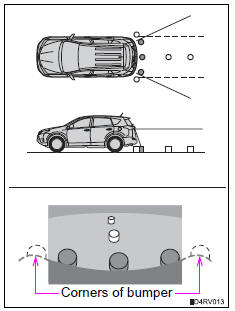
Rear view monitor system precautions Area displayed on screenThe rear view monitor system displays an image of the view from the bumper of the rear area of the vehicle.
The image on the rear view monitor system can be adjusted: refer to p. 400.
- The area displayed on the screen may vary according to vehicle orientation conditions.
- Objects which are close to either corner of the bumper or under the bumper cannot be displayed.
- The camera uses a special lens.
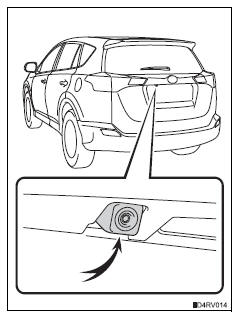
Rear view monitor system camera
The camera for the rear view monitor system is located above the license plate.
- Using the camera
If the camera lens becomes dirty, it cannot transmit a clear image. If water droplets, snow or mud adhere to the lens, rinse with water and wipe with a soft cloth. If the lens is extremely dirty, wash it with a mild cleanser and rinse.
Differences between the screen and the actual roadThe distance guide lines and the vehicle width extension guide lines may not actually be parallel with the dividing lines of the parking space, even when they appear to be so. Be sure to check visually.
The distances between the vehicle width extension guide lines and the left and right dividing lines of the parking space may not be equal, even when they appear to be so. Be sure to check visually.
The distance guide lines give a distance guide for flat road surfaces.
In any of the following situations, there is a margin of error between the fixation guide lines on the screen and the actual distance/ course on the road.
- When the ground behind the vehicle slopes up sharply
The distance guide lines will appear to be closer to the vehicle than the actual distance.
Because of this, objects will appear to be farther away than they actually are. In the same way, there will be a margin of error between the guide lines and the actual distance/course on the road.
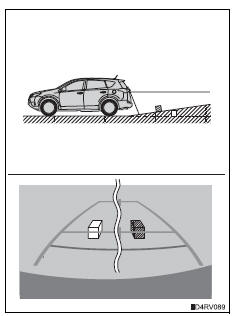
- When the ground behind the vehicle slopes down sharply
The distance guide lines will appear to be further from the vehicle than the actual distance.
Because of this, objects will appear to be closer than they actually are.
In the same way, there will be a margin of error between the guide lines and the actual distance/course on the road.
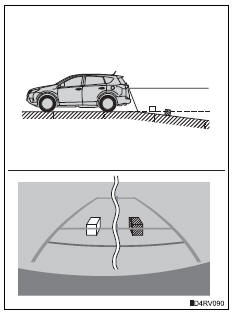
- When any part of the vehicle sags
When any part of the vehicle sags due to the number of passengers or the distribution of the load, there is a margin of error between the fixation guide lines on the screen and the actual distance/ course on the road. 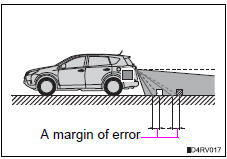
When approaching three-dimensional objects
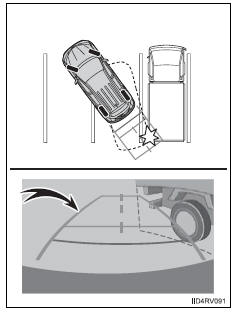
The distance guide lines are displayed according to flat surfaced objects (such as the road). It is not possible to determine the position of three-dimensional objects (such as vehicles) using the distance guide lines. When approaching a three-dimensional object that extends outward (such as the flatbed of a truck), be careful of the following.
- Vehicle width extension guide lines
Visually check the surroundings and the area behind the vehicle. In the case shown in the illustration, the truck appears to be outside of the vehicle width extension guide lines and the vehicle does not look as if it hits the truck.
However, the rear body of the truck may actually cross over the vehicle width extension guide lines. In reality if you back up as guided by the vehicle width extension guide lines, the vehicle may hit the truck.
- Distance guide lines
Visually check the surroundings and the area behind the vehicle. On the screen, it appears that a truck is parking at point 2 . However, in reality if you back up to point 1 , you will hit the truck. On the screen, it appears that 1 is closest and 3 is farthest away. However, in reality, the distance to 1 and 3 is the same, and 2 is farther 1 than and 3.

Things you should know If you notice any symptoms
If you notice any of the following symptoms, refer to the likely cause and the solution, and re-check.
If the symptom is not resolved by the solution, have the vehicle inspected by your toyota dealer.
| Symptom | Likely cause | Solution |
| The image is difficult to see |
|
If this happens due to these causes, it does not indicate a malfunction. |
Back up while visually checking the vehicle’s surroundings. (Use the monitor again once conditions have been improved.) The image on the rear view monitor system can be adjusted: refer to p. 400.
Wash with a mild soap if the dirt is stubborn.
- The vehicle is tilted (there is a heavy load on the vehicle, tire pressure is low due to a tire puncture, etc.)
- The vehicle is used on an incline.
The rear view monitor system is a supplemental device intended to assist the driver when backing up. When backing up, be sure to check visually behind and all around the vehicle before proceeding.
Observe the following precautions to avoid an accident that could result in death or serious injuries.
- Never depend on the rear view monitor system entirely when backing up.
The image and the position of the guide lines displayed on the screen may differ from the actual state.
Use caution, just as you would when backing up any vehicle.
- Be sure to back up slowly, depressing the brake pedal to control vehicle speed.
- The instructions given are only guide lines.
When and how much to turn the steering wheel will vary according to traffic conditions, road surface conditions, vehicle condition, etc. When parking.
It is necessary to be fully aware of this before using the rear view monitor system.
- When parking, be sure to check that the parking space will accommodate your vehicle before maneuvering into it.
- Do not use the rear view monitor system in the following cases:
- On icy or slick road surfaces, or in snow
- When using tire chains or the compact spare tire (if equipped)
- When the back door is not closed completely
- On roads that are not flat or straight, such as curves or slopes.
- In low temperatures, the screen may darken or the image may become faint. The image could distort when the vehicle is moving, or you may become unable to see the image on the screen. Be sure to check direct visually and with the mirrors all around the vehicle before proceeding.
- If the tire sizes are changed, the position of the fixation guide lines displayed on the screen may change.
- The camera uses a special lens. The distances between objects and pedestrians that appear in the image displayed on the screen will differ from the actual distances.
How to use the camera
- The rear view monitor system may not operate properly in the following cases.
- If the back of the vehicle is hit, the position and mounting angle of the camera may change.
- As the camera has a water proof construction, do not detach, disassemble or modify it. This may cause incorrect operation.
- Do not strongly rub the camera lens. If the camera lens is scratched, it cannot transmit a clear image.
- Do not allow organic solvent, car wax, window cleaner or glass coat to adhere to the camera. If this happens, wipe it off as soon as possible.
- If the temperature changes rapidly, such as when hot water is poured on the vehicle in cold weather, the system may not operate normally.
- When washing the vehicle, do not apply intensive bursts of water to the camera or camera area. Doing so may result in the camera malfunctioning.
- Do not expose the camera to strong impact as this could cause a malfunction.
If this happens, have the vehicle inspected by your toyota dealer as soon as possible.
Test yourself
A quick Toyota RAV4 quiz: every answer comes with an explanation and a link to the manual page.