Navigation
Bluetooth tel check mode
In this manual: Navigation
7steps
~42min
2/5difficulty
Done 0 of 7
HINT: Illustration may differ from the actual vehicle depending on the device settings and options. Therefore, some detailed area may not be shown exactly the same as on the actual vehicle.
1. ENTER DIAGNOSTIC MODE
2. BLUETOOTH TEL CHECK

- Select "Bluetooth TEL Check" from the "Diagnosis MENU" screen.
3. BLUETOOTH CHECK
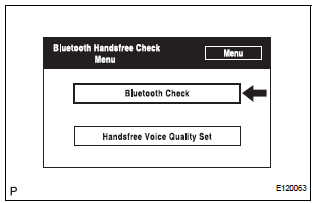
- Select "Bluetooth Check" from the "Bluetooth Handsfree Check Menu" screen
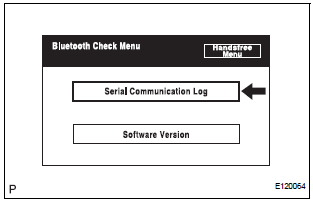
- Select "Serial Communication Log" from the "Bluetooth Check Menu" screen.
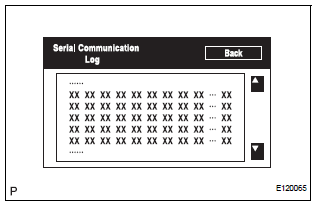
- The communication log data in the display ECU are displayed on this screen.
HINT: The displayed data can be used as a reference.
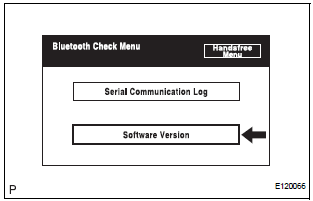
- Select "Software Version" from the "Bluetooth Check Menu" screen.
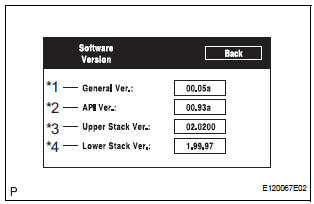
- Check the software version of the Bluetooth module.
Screen Description:
Display |
Contents |
| General Version / *1 |
|
| API Version / *2 | API software version is displayed. |
| Upper Stack Version / *3 | Upper Stack version is displayed |
| Lower Stack Version / *4 | Lower Stack version is displayed. |
HINT: This function is controlled by the built-in display ECU.
4. HANDSFREE VOICE QUALITY SET
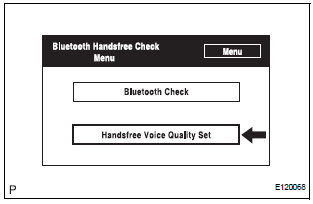
- Select "Handsfree Voice Quality Set" from the "Bluetooth Handsfree check Menu" screen.
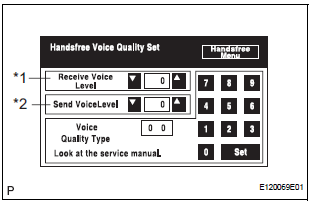
- Check the handsfree voice level.
Screen Description:
Display |
Contents |
| Received voice level adjustment / *1 | Setting possible for the voice level received from Bluetooth compatible phones. |
| Sent voice level adjustment / *2 | Setting possible for the voice set to Bluetooth compatible phones. |
HINT: This function is controlled by the built-in display ECU.
NOTICE: "Voice Quality Type" should not be changed.
Test yourself
A quick Toyota Sienna quiz: every answer comes with an explanation and a link to the manual page.
Was this page helpful?