Multimedia
Displaying a Bluetooth device details
In this manual: Multimedia
6steps
~36min
2/5difficulty
Done 0 of 6
You can confirm and change the registered device details.
Bluetooth device registration status
1. Display the "Bluetooth Setup" screen.
2. Select the device.
3. Select "Device Info".
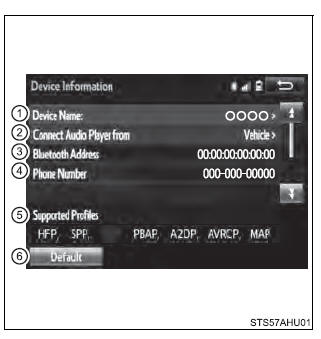
4. Following screen is displayed:
- Device name
- Change connection method
- Bluetooth address
- Display your telephone number
The number may not be displayed depending on the model of phone. - Compatibility profile of the device
- Restore default settings
Changing connection method
1. Select "Connect Audio Player from".
2. Select "Vehicle" or "Device".
"Vehicle": Connect the multimedia system to the portable audio player.
"Device": Connect the portable audio player to the multimedia system.
Was this page helpful?