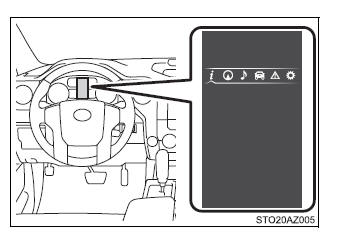
Select to enable selection of an audio source or track on the meter using the meter control switches.
Vehicle information
Select to display the operational status of the following systems:
LDA (Lane Departure Alert)
Dynamic radar cruise control
Tire inflation pressure
Trailer brake controller
Warning message display
Select to display warning messages and measures to be taken if a malfunction is detected.
Settings display
Select to change the meter display settings.
*: If equipped
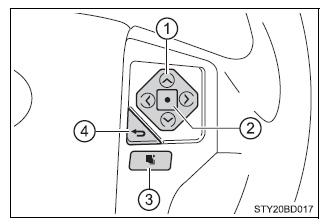
■ Operating the meter control switches
Select an item/change pages
Press: Enters/Sets Press and hold: Resets
Switch menu/Displays the top screen
Returns to the previous screen
Drive information
Total Average/Tank Average/Trip Average Displays the average fuel consumption since the function was reset, the vehicle was refueled, or the engine was started, respectively Use the displayed average fuel consumption as a reference.
Range Displays the estimated maximum distance that can be driven with the quantity of fuel remaining, the distance driven after the engine was started or the distance since the function was reset, respectively.
This distance is computed based on your average fuel consumption. As a result, the actual distance that can be driven may differ from that displayed.
When only a small amount of fuel is added to the tank, the display may not be updated.
When refueling, turn the engine switch off. If the vehicle is refueled without turning the engine switch off, the display may not be updated.
Current Displays the current rate of fuel consumption
Average Speed*/Trip Average Speed Displays the average since engine was started or the average since the function was reset, respectively
Total Time*/Trip Time Displays the engine was started or the elapsed time since the function was reset, respectively
Trip distance Displays the distance since the engine was started
Digital speedometer
Display off A blank screen is displayed
*: Resetting procedures:
Select a function to be reset using the meter control switch and then press and hold the center button to reset.
If there is more than one function that can be reset, check boxes will be displayed next to the functions.
Settings display
The settings of the following items can be changed.
For functions that can be enabled or disabled, the function switches between on and off each time is pressed.
LDA (Lane Departure Alert)*1
LDA Sensitivity Select to set up the LDA (Lane Departure Alert) sensitivity.
Sway warning Select to enable/disable the Sway warning function.
Sway warning sensitivity Select to set up the sway warning sensitivity.
PCS (Pre-Collision System)*1
PCS Select to enable/disable the PCS (Pre-Collision System) function.
Sensitivity Select to set up the PCS (Pre-Collision System) sensitivity.
BSM (Blind Spot Monitor)*1 Select to enable/disable the Blind Spot Monitor function.
RCTA (Rear Cross Traffic Alert)*1 Select to enable/disable the Rear Cross Traffic Alert function.
Vehicle Settings
BSM Brightness*1 Select to set up the BSM (Blind Spot Monitor) outside rear view mirror indicators brightness.
RCTA volume*1 Select to set up the RCTA (Rear Cross Traffic Alert) warning buzzer volume.
TBC Trailer Type*1 Select to set up the trailer brake type.
Maintenance reset*2 Select to reset the message after the required maintenance is performed.
Meter setting
Language Select to change the language on the display.
Units Select to change the unit of measure for fuel consumption and temperature.
Switch settings You can register 1 screen as the top screen. To register, press and hold while the desired screen is displayed.
There are also screens that cannot be setup as the Top Screen.
Drive information 1 and 2 Select to select up to 2 items that will be displayed on a Drive information screen, up to 2 Drive information screens can be set.
Pop-up display Select to set the following pop-up displays, which may appear in some situations, on/off.
Route guidance display of the navigation system-linked system (if equipped)
Incoming call display of the hands-free phone system
Instrument panel brightness adjustment display
Accent color Select to change the accent colors on the screen, such as the menu icon color.
Default settings Registered or changed meter settings will be deleted or returned to their default setting.
*1: If equipped *2: For vehicles sold in the U.S.A.
■Setting items
"Vehicle Settings" and "Meter Settings" setting items are not selectable during driving and cannot be operated.
Also, the settings screen is temporarily canceled in the following situations.
When a warning message appears.
When the vehicle begins to move.
Settings for functions not equipped to the vehicle are not displayed.
When a function is turned off, the related settings for that function are not selectable.
■Pop-up display In some situations, such as when a switch operation is performed, a pop-up display will be temporarily displayed on the multi-information display.
■When disconnecting and reconnecting battery terminals The drive information will be reset.
■Trip summary display When the engine switch is turned off, each of the following will be displayed on the multi-information display, and will clear after approximately 30 seconds.
Distance traveled
Average fuel consumption
Driving range
■Tire inflation pressure
It may take a few minutes to display the tire inflation pressure after the engine switch is turned to the "ON" position. It may also take a few minutes to display the tire inflation pressure after inflation pressure has been adjusted.
"---" may be displayed if the tire position information cannot be determined due to unfavorable radio wave conditions.
Tire inflation pressure changes with temperature. The displayed values may also be different from the values measured using a tire pressure gauge.
■Liquid crystal display Small spots or light spots may appear on the display. This phenomenon is characteristic of liquid crystal displays, and there is no problem continuing to use the display.
WARNING
■Caution for use while driving
When operating the multi-information display while driving, pay extra attention to the safety of the area around the vehicle.
Do not look continuously at the multi-information display while driving as you may fail to see pedestrians, objects on the road, etc. ahead of the vehicle.
■Cautions during setting up the display As the engine needs to be running during setting up the display, ensure that the vehicle is parked in a place with adequate ventilation. In a closed area such as a garage, exhaust gases including harmful carbon monoxide (CO) may collect and enter the vehicle. This may lead to death or a serious health hazard.
NOTICE
■During setting up the display To prevent battery discharge, ensure that the engine is running while setting up the display features.
 Drive information
 Navigation system-linked display
 Audio system-linked display
 Vehicle information
 Warning message display
 Settings display
 pressed.
 while the desired screen is displayed.