General body repairs, exterior
Removing and installing Bowden cable
In this manual: General body repairs, exterior
~1min read
Removing |
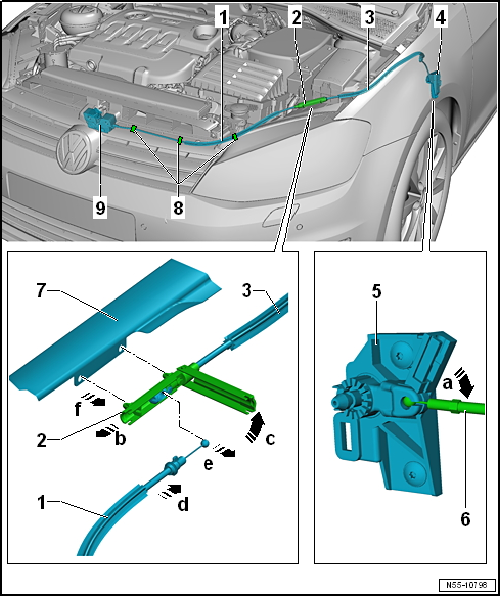
- Open bonnet.
- Remove release lever → Chapter.
- Remove Bowden cable -3- from mounting bracket -5--arrow a-.
- Pull Bowden cable coupling -2- off carrier -7--arrow e-.
- Slightly pull off Bowden cable -1--arrow a-.
- Open cap of Bowden cable coupling -arrow b-.
- Release Bowden cable -1--arrow c- and remove from Bowden cable coupling -2-.
 Note In order to be able to remove or install the Bowden cable -3-, remove the support arm -7- → Chapter.
Installing |
Note
- If the Bowden cable -3- is not removed from mounting bracket, the Bowden cable -1- unhooks again and again when installing the Bowden cable coupling -2-.
- The bonnet cannot be opened in this case
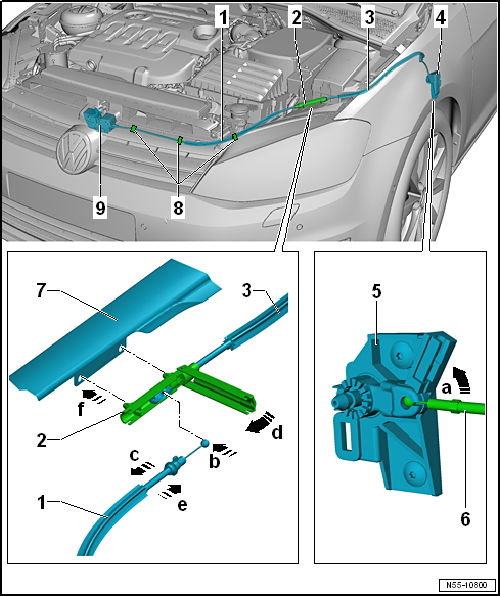
- Hook in Bowden cable -1- into Bowden cable coupling -2--arrow a-.
- Slightly pull Bowden cable off Bowden cable coupling -arrow b-.
- Close Bowden cable coupling -arrow c-.
- Push Bowden cable -1- into Bowden cable coupling -arrow d-.
- Attach Bowden cable coupling -2- to lock carrier -4--arrow e-.
- Install Bowden cable -3- on mounting bracket -5--arrow a-.
- Install release lever → Chapter.
- Before closing bonnet, check function of release lever and Bowden cable.
Test yourself
A quick Volkswagen Golf quiz: every answer comes with an explanation and a link to the manual page.
Was this page helpful?