USB

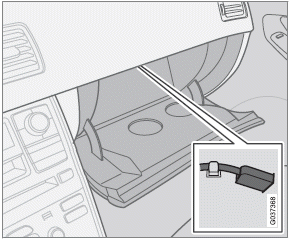
USB connector in glove compartment
If you connect an iPod , MP3 player or a USB flash drive to the optional USB connector, this device can be controlled using the vehicle's audio controls.
1. Select USB with the SELECTOR button.
> Connect device will be displayed.
2. Connect the iPod , MP3 player or USB flash drive to the USB connector (see the illustration).
> The text Loading will be displayed while the system loads the files (folder structure) on the device. This may take a short time.
When the information has been loaded, information about the tracks on the device will be displayed.
The  buttons can be used to fast forward/reverse or change tracks:
• Press briefly to change tracks.
• Press slightly longer to fast forward/reverse.
The arrow keys on the steering wheel keypad can also be used in the same way.
USB flash drive
To simplify the use of a USB flash drive, it is advisable to only store music files on the drive.
It will take considerably longer for the system to index the files on the drive if it contains anything other than compatible music files.
Test yourself
A quick Volvo XC60 quiz: every answer comes with an explanation and a link to the manual page.