Auxiliary sound level

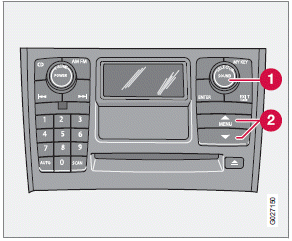
If the external sound source's volume is too high, the quality of the sound may be impaired.
This can be prevented by adjusting the external sound source's input volume.
1. While playing the radio or a CD, lower the audio volume to about one-quarter.
2. Switch to AUX mode on the audio system.
3. Connect the headphone output from your music player to the AUX input using a cable with a stereo 3.5 mm miniplug at both ends.
4. Set your music player's headphone volume to three-quarters using the player's volume controls.
5. Select AUX VOLUME in the menu and press ENTER.
6. Adjust the volume with SELECTOR (1) or with the up/down arrows (2) and press ENTER.
7. If there is distortion, lower your music player's headphone volume until the distortion goes away.
Finally, exit the menu and adjust the audio volume to a comfortable level.
Test yourself
A quick Volvo XC60 quiz: every answer comes with an explanation and a link to the manual page.