Using the Rain Sensor
The rain sensor monitors the amount of water on the windshield and automatically starts the windshield wipers. Rain sensor sensitivity can be adjusted using the thumb wheel on the right-hand steering wheel lever.
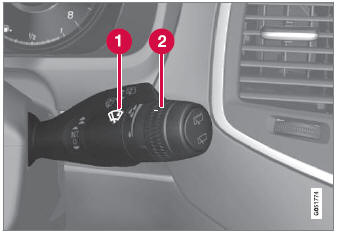
Right-Side Steering Wheel Lever.
 Rain sensor button
 Thumb wheel, sensitivity/interval wiper speed
When the rain sensor is activated, the  rain sensor symbol will be displayed in the instrument panel.
Activating the rain sensor
When the rain sensor is activated, the engine must be running or the ignition in mode I or II while the windshield wiper lever is in position 0 or in the single sweep position.
Activate the rain sensor by pressing the rain sensor button  .
Move the lever down to get additional wiping of the windshield wipers.
Turn the thumb wheel upward for increased sensitivity and downward for decreased sensitivity. The wipers will make one extra sweep when the thumb wheel is turned upward.
Deactivating the rain sensor
Deactivate the rain sensor by pressing the  rain sensor button or moving the lever upward to another wiper mode.
The rain sensor is automatically deactivated in ignition mode 0 or when the engine is switched off.
The rain sensor is also automatically deactivated when the wiper blades are put in the service position. The rain sensor will reactivate when service mode is switched off.
Test yourself
A quick Volvo XC90 quiz: every answer comes with an explanation and a link to the manual page.