Adjusting the Door Mirrors
To improve visibility to the rear, the door mirrors need to be adjusted to the driver's height and seating position.
There are several automatic settings that can also be connected to the memory function buttons for the power seat*.
Controls Used for the Door Mirrors
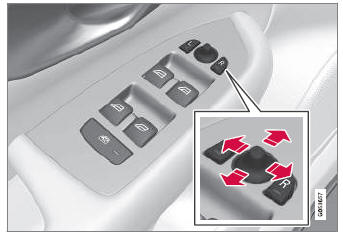
Door mirror controls.
The joystick in the drivers' door control panel is used to adjust the position of the door mirrors. The ignition must be in at least mode I.
- Press the L button for the left door mirror or R for the right door mirror. The button will light up.
- Adjust the position using the joystick located between the buttons.
- Press the L or R button again. The light in the button will go out.
Automatic Folding of the Door Mirrors*
The door mirrors can be automatically folded when driving or parking in tight spaces.
- Press the L and R buttons at the same time.
- Release the buttons after approx. 1 second. The mirrors will stop automatically when fully folded in.
Open the mirrors by pressing L and R at the same time. The mirrors will automatically stop when they reach the last-used setting.
Resetting the Mirror Position
A mirror that has been moved out of position manually (for example, after being hit or bumped) must be returned electrically to its original position for automatic folding* to function properly.
- Fold in the mirrors by pressing the L and R buttons at the same time.
- Open them again by pressing the L and R buttons at the same time.
- Repeat the above procedure as necessary.
The mirrors return to their original positions.
Tilting when parking1
The door mirrors can be tilted down to give the driver a better view along the sides of the vehicle, for example the curb when parking.
- Select reverse gear and press the L or R mirror button.
Note that the button may need to be pressed twice depending on settings. When the door mirror tilts down, the light in the button will flash. When reverse gear is engaged, the door mirrors will automatically start to move after 3 seconds and will reach their original position after approx. 8 seconds.
Automatically tilting when parking¹
With this setting, the door mirrors will automatically tilt down when reverse gear is engaged. The folded position is preset and cannot be adjusted.
- Tap Settings in the center display's Top view.
- Tap My Car
 Mirrors and Convenience.
- Under Exterior Mirror Tilt in Reverse, select Off, Driver, Passenger or Both to activate/deactivate and to select which mirror tilts.
To immediately return the door mirrors to their original position, press the L or R button twice.
Automatic Folding When Locking the Vehicle*
In the center display, you can set the door mirrors to retract/extend automatically when the vehicle is locked/unlocked with the key.
- Tap Settings in the center display's Top view.
- Tap My Car
 Mirrors and Convenience.
- Select Fold mirrors when locked to activate/deactivate.
1 Only on models equipped with a power driver's seat with memory buttons*.
* Option/accessory.
Test yourself
A quick Volvo XC90 quiz: every answer comes with an explanation and a link to the manual page.