Multi-function display
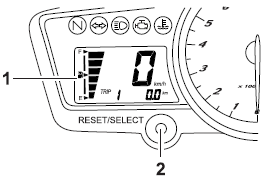
Multi-function display
- Multi-function display
- "RESET/SELECT" button
 WARNING
Be sure to stop the vehicle before making any setting changes to the multi-function display. Changing settings while riding can distract the operator and increase the risk of an accident.
The multi-function display is equipped with the following:
- a speedometer (which shows the riding speed)
- an odometer (which shows the total distance traveled)
- two tripmeters (which show the distance traveled since they were last set to zero)
- a fuel reserve tripmeter (which shows the distance traveled since the fuel level warning light came on)
- a fuel meter
- Be sure to turn the key to "ON" before using the "RESET/ SELECT" button.
- For the U.K. only: To switch the speedometer and odometer/tripmeter displays between kilometers and miles, press the "RESET/SELECT" button for at least eight seconds.
A brief push (less than one second) on the "RESET/SELECT" button switches the display between the odometer mode "ODO" and the tripmeter modes "TRIP 1" and "TRIP 2" in the following order:
ODO → TRIP 1 → TRIP 2 → ODOWhen approximately 1.6 L (0.42 US gal, 0.35 Imp.gal) of fuel remains in the fuel tank, the odometer display will automatically change to the fuel reserve tripmeter mode "F-TRIP" and start counting the distance traveled from that point, and the last segment of the fuel meter will start flashing. In that case, pushing the "RESET/SELECT" button switches the display between the various tripmeter and odometer modes in the following order:
F-TRIP → TRIP 1 → TRIP 2 → ODO → F-TRIPTo reset a tripmeter, select it by pushing the "RESET/SELECT" button briefly (less than one second), and then push the button again for at least three seconds while the selected tripmeter is flashing. If you do not reset the fuel reserve tripmeter manually, it will reset itself automatically and the display will return to the prior mode after refueling and traveling 5 km (3 mi).
Fuel meter
Fuel meter
- Fuel meter
The fuel meter indicates the amount of fuel in the fuel tank. The display segments of the fuel meter disappear towards "E" (Empty) as the fuel level decreases. When the last fuel meter segment starts flashing, refuel as soon as possible.
Test yourself
A quick Yamaha YZF-R125 quiz: every answer comes with an explanation and a link to the manual page.